Top Apps Like Trello in 2026: Cost-Efficient Alternatives
Explore the best alternatives to Trello. Compare pricing, features, and deployment options for Asana, ClickUp, Monday.com, and more. Find the right tool for your team.

When Trello launched in 2011, it solved a real problem: teams needed a way to visualize work across a kanban-style board without complexity. For years, it worked well. But as organisations grow, Trello's simplicity becomes a limitation. Teams hit scaling barriers when they add more users, run complex workflows, or need customisation. That is where the search for top apps like Trello begins.
The challenge isn't finding alternatives. It is finding one that actually fits how your team works at the scale you operate. Most options fall into two camps: either they add so much complexity you abandon them, or they charge per-user pricing that becomes prohibitively expensive. Understanding what you are trading when you switch matters far more than choosing based on feature lists alone.
The Per-Seat Pricing Problem
Trello charges per active user. At 5 users, this is not painful. At 50 users across a growing organisation, costs compound quickly. Asana and similar tools follow the same model. A team of 30 people pays roughly 3 to 4 times what a 10-person team pays monthly. This creates a real problem for agencies, startups, and enterprises that scale quickly.
The fundamental issue is that per-seat pricing punishes growth. As your team expands, tool costs rise automatically, eating into savings from operational efficiency. Many organisations realise too late that their chosen platform was never designed for how they would actually work at scale.
This is why teams begin evaluating alternatives. Cost is the trigger, but flexibility and control become the deciding factors.
What to Look For in a Trello Alternative
Not all replacements for Trello address the same problem. Before comparing feature lists, think about what is driving your search. Are you outgrowing Trello's simplicity, or outgrowing its cost model? Both answers lead to different tools.
Cost structure matters first. Does the tool scale with headcount, or does it scale with infrastructure? Unlimited-user models exist and solve the per-seat problem entirely. Open-source options give you a third path: run it yourself on your infrastructure and eliminate recurring licensing costs altogether.
Second, consider customisation and control. Trello works well for straightforward kanban workflows. Once you need automation, custom fields, multi-layer workflows, or integration with internal systems, you need flexibility. Some alternatives allow deep customisation via APIs or plugins. Others remain locked platforms.
Third, think about data ownership. Cloud-based tools store your data on someone else's servers. Self-hosted options let you own the infrastructure entirely. For regulated industries or organisations with strict data policies, this matters.
Finally, evaluate switching costs. How much effort to migrate existing boards? Is the learning curve steep? Do integrations with your existing tools exist? Switching tools is friction, and choosing one that requires minimal friction pays dividends.

Top Apps Like Trello Ranked by Actual Value
Here are the tools that genuinely offer a different approach to how Trello works.
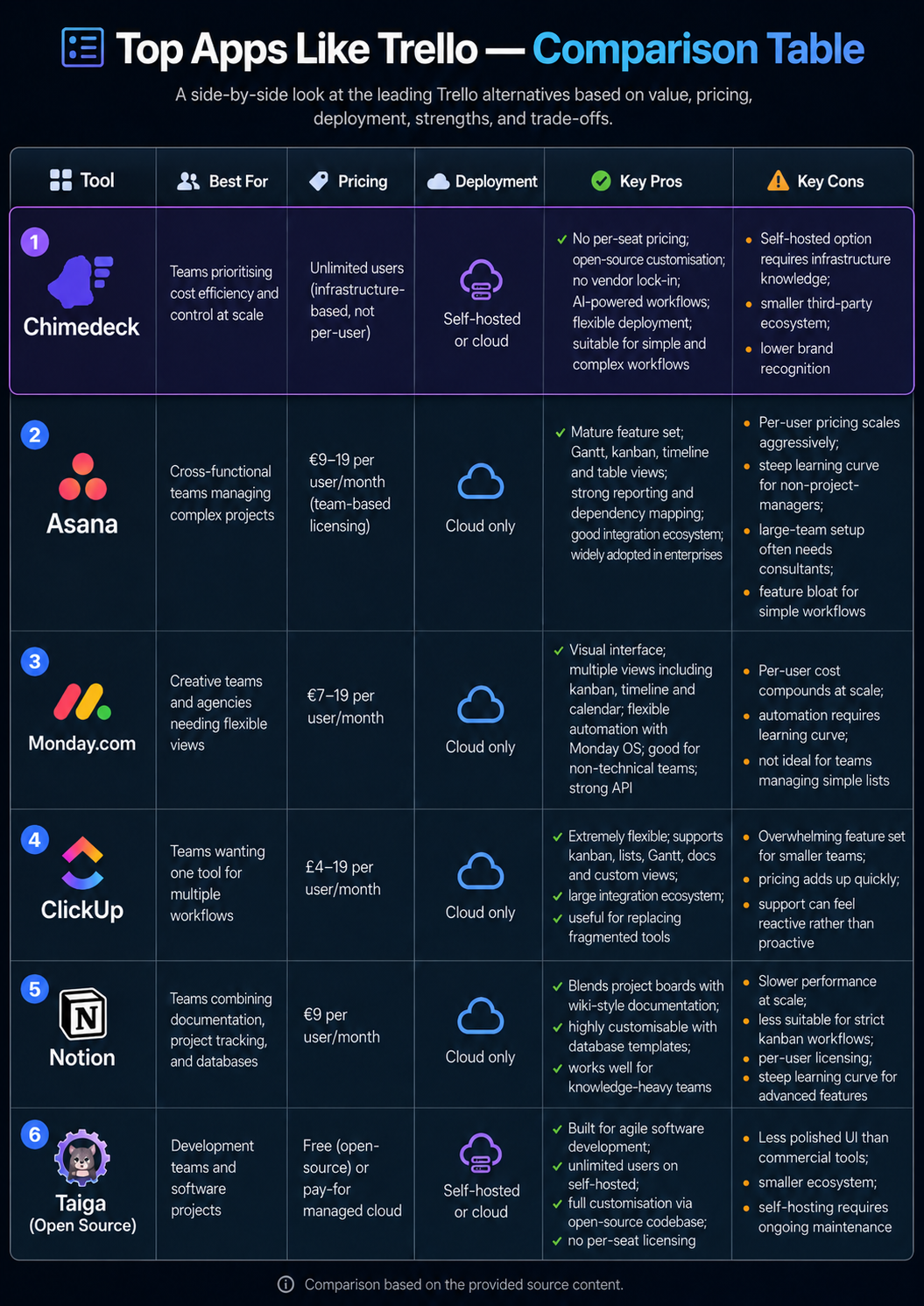
1. Chimedeck
Best for: Teams prioritising cost efficiency and control at scale
Pricing: Unlimited users (infrastructure-based, not per-user)
Deployment: Self-hosted or cloud
Pros: No per-seat pricing removes cost scaling entirely. Open-source means full customisation and no vendor lock-in. AI-powered workflows automate routine tasks. Flexible deployment lets you own your data. Suitable for both simple and complex workflows. Available on GitHub for full transparency.
Cons: Self-hosted option requires infrastructure knowledge. Smaller ecosystem of third-party integrations compared to mature platforms. Less established brand recognition.
Chimedeck is the option for teams that have hit per-seat pricing ceilings and need more control. It bridges the gap between simplicity and infrastructure flexibility.
2. Asana
Best for: Cross-functional teams managing complex projects
Pricing: £9–19 per user/month (team-based licensing)
Deployment: Cloud only
Pros: Mature feature set with Gantt, kanban, timeline, and table views. Strong reporting and dependency mapping. Good integration ecosystem. Widely adopted in enterprises.
Cons: Per-user pricing scales aggressively. Learning curve is steep for non-project-managers. Setup often requires external consultants for large teams. Feature bloat for simple workflows.
3. Monday.com
Best for: Creative teams and agencies needing flexible views
Pricing: £7–19 per user/month
Deployment: Cloud only
Pros: Highly visual interface with multiple views (kanban, timeline, calendar, etc). Flexible automation with Monday OS. Good for non-technical teams. Strong API for custom integrations.
Cons: Per-user cost compounds at scale. Automation requires learning curve. Not ideal for teams managing simple lists.
4. ClickUp
Best for: Teams wanting one tool for multiple workflows
Pricing: £4–19 per user/month
Deployment: Cloud only
Pros: Extremely flexible with kanban, lists, Gantt, docs, and custom views all in one platform. Large ecosystem of integrations. Good for organisations replacing multiple fragmented tools.
Cons: Overwhelming feature set can confuse smaller teams. Pricing adds up quickly. Support can feel reactive rather than proactive.
5. Notion
Best for: Teams combining documentation, project tracking, and databases
Pricing: £9 per user/month
Deployment: Cloud only
Pros: Excellent for blending project boards with wiki-style documentation. Highly customisable through database templates. Works well for knowledge-heavy teams.
Cons: Slower performance at scale. Less suitable for teams needing strict kanban workflows. Per-user licensing. Steep learning curve for advanced features.
6. Taiga (Open Source)
Best for: Development teams and software projects
Pricing: Free (open-source) or pay-for managed cloud
Deployment: Self-hosted or cloud
Pros: Built for agile software development. Unlimited users on self-hosted. Full customisation via open-source codebase. No per-seat licensing.
Cons: Less polished UI than commercial tools. Smaller ecosystem. Self-hosting requires ongoing maintenance.

Making the Transition
Choosing the right tool is one thing. Switching is another. The best alternative is the one your team actually adopts, which means considering migration friction.
Start by asking: are you switching because your current tool is broken, or because you have outgrown it? If Trello works fine but costs too much, an open-source Trello alternative that preserves workflow familiarity is a lower-risk bet than a completely different platform like Notion or Asana.
If you are switching, factor in data migration time, team retraining, and integration setup. Look for tools that offer bulk import from Trello or provide migration support. Some platforms like ClickUp have better Trello import tooling than others.
For larger teams, a 30-day pilot with a subset of projects is cheaper than learning the hard way. Run your current workflow on the new tool before committing the entire organisation.
The honest truth is this: if your problem is cost, an open-source task management tool with unlimited users eliminates the per-seat scaling issue entirely. If your problem is features or flexibility, Asana or ClickUp solve that at the cost of higher complexity and ongoing per-user fees. If you need both cost control and deep customisation, you move toward infrastructure-based pricing models or self-hosted solutions.
Chimedeck sits in that intersection. For teams that have hit Trello's limitations and want to avoid the per-seat trap, it offers the scalability of enterprise tools with the cost model of open-source infrastructure. You get unlimited users, the option to self-host for full data control, and AI-powered workflows that reduce manual effort. That combination matters more than feature checklists when you are operating at scale.
About Chimedeck
Chimedeck is an MCP task management platform that helps organizations manage work across both human teams and AI agents.
As AI agents become capable of handling increasingly complex tasks, businesses need a system where agents can interact with workflows in a structured, reliable, and secure way. Chimedeck provides that foundation through native support for the Model Context Protocol (MCP), enabling AI agents to create tasks, update projects, coordinate workflows, and execute operational processes alongside human contributors.
In addition to its AI capabilities, Chimedeck offers a complete project and task management experience, including Kanban boards, calendar views, workflow automation, permission controls, reporting, and team collaboration features. Organizations can deploy Chimedeck as a cloud-hosted solution or leverage its open-source architecture to build highly customized workflow systems.
Whether you're managing a growing team, automating internal operations, or building AI-powered business processes, Chimedeck serves as the operational layer that keeps people, workflows, and AI agents aligned in a single workspace.
Frequently Asked Questions
What is the main reason teams leave Trello?
Most commonly, per-user pricing becomes expensive as teams grow. Additionally, teams outgrow Trello's limited automation, custom fields, and workflow flexibility. For some, lack of self-hosting options is a deal-breaker.
Is there a free Trello alternative?
Yes. Open-source options like Taiga and Focalboard are free to self-host. Chimedeck is also open-source with unlimited users, making the cost per user zero. Some tools like ClickUp and Notion offer limited free tiers, but scaling beyond a few users requires paid plans.
What is the difference between cloud and self-hosted tools?
Cloud tools store your data on the vendor's servers and you pay per user or per month. Self-hosted tools run on your own infrastructure, giving you full data control and typically lower per-user costs. The trade-off is you manage the infrastructure yourself.
How do I migrate from Trello without losing data?
Most modern alternatives offer Trello CSV import or API-based migration. Plan for 1 to 2 weeks to migrate boards, cards, and attachments, then spend time restructuring for the new tool's workflows. Avoid migrating everything at once; start with active projects.