Task Management Tools Comparison Guide: Cost, Control & Customisation
Compare task management tools for cost, workflow flexibility, data ownership, self-hosting, automation, and team scalability

Modern teams do not usually struggle because they lack motivation. They struggle because work becomes scattered, priorities change faster than systems can handle, and the tools that once felt simple begin to create friction. A startup may begin with Trello because it is visual and easy to adopt. An agency may rely on spreadsheets, Slack messages, and client-specific boards to keep projects moving. An engineering team may combine GitHub Issues, Jira, documentation, and weekly standups just to understand what is actually happening.
At a small scale, this may be manageable. But as soon as more people, more clients, more workflows, and more deadlines enter the picture, the limitations become obvious. Costs rise with every new seat. Boards become crowded. Permissions become harder to manage. Leaders lose visibility. Teams start adapting their processes to fit the tool instead of using a tool that fits the way they actually work.
That is why a Task Management Tools Comparison is no longer just about choosing a nicer interface. It is about understanding which platform can support long-term productivity, workflow customization, data ownership, operational efficiency, and team collaboration.
For teams looking for an Open Source Trello Alternative, Chimedeck offers a more flexible approach. It gives teams open-source customization, self-hosted deployment options, full workflow control, better cost efficiency, and ownership over their data and processes. The real question is simple: could your team achieve more with a task management platform you truly control?
What Is a Task Management Tools Comparison?
A Task Management Tools Comparison is the process of evaluating different task management software based on how well each platform supports planning, execution, collaboration, workflow automation, reporting, and scale. It is not only about whether a tool has boards, cards, due dates, or notifications. Most modern productivity tools have those features. The more important question is whether the platform can support your team’s real operating model.
For example, a marketing agency may need a workflow that moves from strategy to content production, design, internal review, client approval, and final delivery. A software development team may need backlog grooming, sprint planning, development, code review, QA, release, and post-release monitoring. A startup founder may need one shared view across product, sales, marketing, hiring, and operations.
A useful Task Management Tools Comparison helps teams decide whether a project management platform is suitable for their actual needs, not just their current team size. It should consider usability, pricing, workflow customization, Kanban board structure, permissions, automation, integrations, self-hosted software options, reporting, and data ownership.
This type of comparison is especially valuable for startup founders, product managers, engineering managers, marketing teams, operations teams, distributed teams, and agencies managing multiple client projects. It is also highly relevant for organizations looking for a [Self-Hosted Trello Alternative] or an open source project management solution that can scale without the typical constraints of closed SaaS platforms.
=>>> Read More: Top Simple Task Management App 2026: A Practical Guide
Why Teams Are Moving Beyond Trello
Trello remains one of the most popular Kanban board tools because it is simple, visual, and easy to understand. For early-stage teams, that simplicity is often exactly what they need. A founder can create a board in minutes, invite teammates, and start moving cards from “To Do” to “Done” without a complex onboarding process.
However, the same simplicity that makes Trello attractive can become restrictive as a team grows. More departments, more stakeholders, more task types, and more approval layers create operational complexity. At that point, teams often need deeper workflow customization, stronger permissions, better automation, more control over data, and a pricing model that does not penalize collaboration.
One of the biggest concerns is per-seat pricing. A small team may not feel the cost immediately, but the cost structure becomes more noticeable when companies add contractors, clients, external reviewers, temporary collaborators, and cross-functional teams. Agencies feel this problem especially clearly because collaboration often extends beyond internal employees. Every client stakeholder, freelancer, designer, writer, or strategist can become another paid seat depending on the SaaS model.
Workflow constraints are another common challenge. A simple board works well when the process is linear, but modern teams rarely work in one straight line. Product teams need prioritization, roadmap planning, sprint cycles, QA reviews, and release tracking. Marketing teams need editorial workflows, SEO checks, design reviews, approvals, and publishing schedules. Operations teams need recurring processes, escalation rules, and accountability tracking. When the tool cannot reflect these workflows properly, teams create workarounds that become messy over time.
Data ownership is also becoming more important. Task data is not just basic operational information. It shows how decisions are made, where work gets blocked, how teams perform, and how business processes evolve. For companies handling sensitive client work, regulated information, or internal strategic planning, control over where that data lives and how it is accessed matters. This is one reason self-hosted software and open source project management platforms are becoming more relevant for serious teams.
Chimedeck vs Trello vs Asana: Task Management Tools Comparison
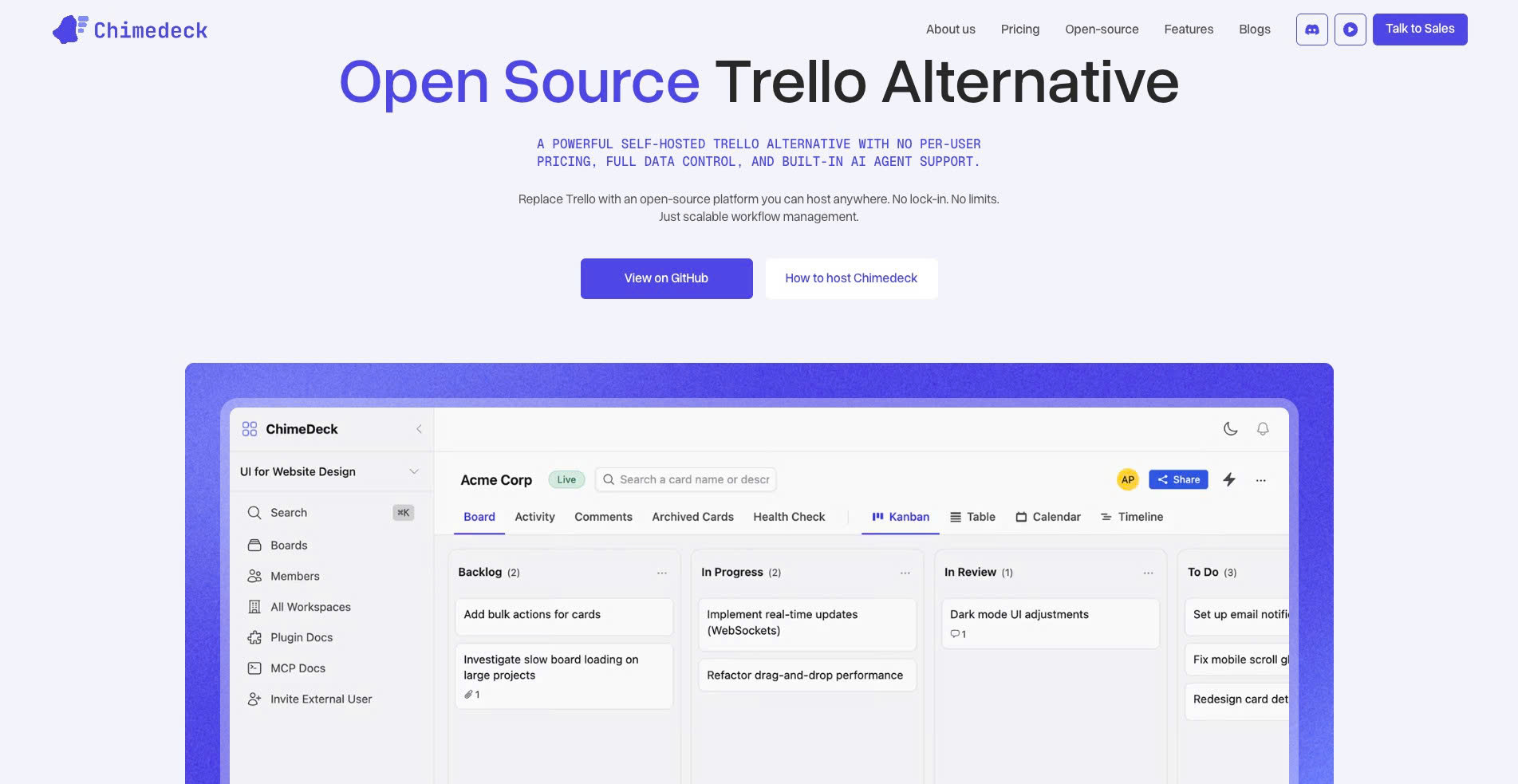
A strong Task Management Tools Comparison should look at practical business needs rather than surface-level popularity. Trello, Asana, and Chimedeck can all support project tracking, but they are built around different assumptions.
Trello is best known for simple Kanban-style task management. It is easy to use and works well for small teams that need a lightweight visual system. Asana is a broader project management platform designed for structured work management across teams, departments, and project types. Chimedeck is different because it is positioned as an open-source and self-hosted task management platform for teams that want more control over customization, deployment, and data ownership.
The Advantages of Open Source and Self-Hosted Task Management
Open source and self-hosted task management software is gaining attention because more teams want to build systems that match their processes instead of adjusting their processes to match a vendor’s limitations. This is especially true for engineering teams, agencies, and operations-heavy businesses where workflow design can directly affect delivery speed and quality.
With a self-hosted platform like Chimedeck, teams gain more control over infrastructure, deployment, access, and data storage. This can be valuable for companies that need stronger privacy, internal governance, or compliance alignment. It also supports organizations that want to avoid relying entirely on a third-party SaaS provider for critical operational data.
For engineering teams, the benefits can go even further. Developers often need task management software to connect with code repositories, release workflows, documentation, CI/CD processes, bug reports, and internal dashboards. A closed SaaS tool may provide standard integrations, but those integrations do not always match the way a technical team actually works. An open-source project management platform gives teams more room to customize the system around their development lifecycle.
Agencies also benefit from flexible workflow customization. A client delivery workflow may include briefing, scoping, production, internal QA, client review, revision, approval, delivery, reporting, and renewal planning. If the tool cannot support that structure cleanly, teams end up spreading work across multiple platforms. This creates confusion, delays, and unnecessary communication overhead.
Cost efficiency is another major advantage. Per-seat SaaS pricing can discourage collaboration because every new user adds cost. This is a problem when a team wants to invite clients, external contractors, temporary collaborators, or cross-functional stakeholders. Chimedeck’s open-source and self-hosted approach makes it easier to scale collaboration without making every additional user a budget concern.
=>>> Related Post: Best Task Management Tools for Teams 2026
How to Migrate from Trello to Chimedeck
Migrating from Trello to Chimedeck should not be treated as a simple copy-and-paste exercise. It is a chance to improve the way your team manages work. Many teams make the mistake of transferring old boards exactly as they are, including outdated lists, unclear labels, abandoned cards, and inefficient processes. A better migration starts with workflow analysis.
First, audit your existing Trello boards. Identify which boards are still active, which ones are outdated, and which ones duplicate the same process. Pay attention to labels, due dates, task owners, comments, automations, and attachments. This audit helps you understand what should be migrated, what should be archived, and what should be redesigned.
Next, export your board data and keep a backup before importing anything into the new platform. Depending on your export method, you may need to capture board names, lists, cards, labels, members, due dates, checklists, comments, and attachments. This step is important because migration can become messy if teams do not preserve the original data structure.
Once the export is complete, map your old Trello workflow to your new Chimedeck workflow. This is where many teams should pause and think carefully. A list called “Doing” may need to become “In Progress.” A list called “Waiting” may need to become “Blocked.” A broad “Review” stage may need to be separated into internal review, client review, and final approval. The goal is not to recreate Trello inside Chimedeck. The goal is to build a better task management system.
A practical migration flow usually looks like this:
- Audit active and inactive boards.
- Export existing Trello data.
- Clean outdated cards, labels, and duplicate workflows.
- Map old lists to improved Chimedeck workflow stages.
- Import tasks in controlled batches.
- Configure user permissions and access levels.
- Rebuild automations based on the new workflow.
- Train team members on the new operating rules.
- Measure adoption and optimize after launch.
The most common migration mistakes are importing too much historical clutter, keeping unclear labels, failing to define permissions, and skipping team training. These issues are avoidable if the migration is treated as an operational improvement project rather than a technical transfer.
After the migration, track whether the new system is actually improving performance. Useful indicators include task completion rate, average cycle time, overdue task volume, blocked task percentage, review turnaround time, and team adoption rate. A successful migration should result in clearer ownership, fewer status meetings, better visibility, and stronger delivery consistency.
How to Build a Scalable Team Workflow
A task management tool is only as effective as the workflow behind it. Many teams blame the software when the real problem is that their process is unclear. Before choosing any project management platform, teams should define how work should move from idea to completion.
Start by identifying your core processes. A software team may need separate workflows for feature development, bug tracking, sprint planning, and release management. A marketing team may need workflows for campaign planning, content production, SEO optimization, design, approval, and publishing. An agency may need workflows for client onboarding, production, revision, reporting, and account growth.
Once the processes are clear, design board structures that reflect real work. Some teams organize boards by department, while others organize by client, project, product area, or sprint cycle. There is no universal structure that works for everyone. The best structure is the one that makes ownership, priority, and progress visible without creating unnecessary complexity.
Ownership is one of the most important parts of scalable workflow design. Every task should have one accountable owner, even if multiple people are involved. When accountability is unclear, tasks slow down because everyone assumes someone else is responsible. Clear ownership helps teams reduce delays and improve execution.
Prioritization should also be simple enough for everyone to understand. Teams do not need an overly complicated scoring model for every task. In many cases, a straightforward system works better: critical tasks block revenue, customers, launches, or security; high-priority tasks support current goals; medium-priority tasks are useful but not urgent; low-priority tasks are optional; backlog items are not ready for execution.
Automation should be added carefully. Workflow automation can improve operational efficiency, but too much automation can confuse users if the logic is unclear. Start with practical automations such as recurring tasks, deadline reminders, review notifications, approval handoffs, and overdue task alerts. Once the team understands the workflow, more advanced automation can be introduced.
Finally, measure the workflow regularly. A scalable system should help leaders answer important questions: Where does work get stuck? Which tasks are frequently delayed? Which stage creates the most rework? Are reviews happening quickly enough? Are teams delivering more predictably than before? These questions turn task management software into a real operating system for team performance.
Future Trends in Task Management Software
The future of task management software is being shaped by AI, open-source collaboration, self-hosted infrastructure, remote work, and data sovereignty. Teams are no longer looking only for digital boards. They are looking for intelligent systems that help them plan, execute, automate, and improve the way work gets done.
AI-assisted task management is one of the clearest trends. Teams are beginning to use AI to summarize project updates, generate checklists, identify blockers, extract tasks from meeting notes, and suggest next steps. For product managers, this can reduce manual coordination. For agencies, it can speed up reporting and client updates. For engineering teams, it can help identify stale tasks or unresolved blockers.
Agentic workflows may take this even further. Instead of simple automation rules, AI agents may eventually monitor projects, recommend actions, prepare status reports, and coordinate repetitive operational tasks. However, this future will require strong governance. Teams will need permission controls, audit logs, approval workflows, and clear boundaries between AI assistance and human decision-making.
Open-source project management is also becoming more relevant. Technical teams want platforms they can inspect, customize, and extend. Organizations that do not want to depend entirely on vendor roadmaps are more likely to consider open-source tools. This is especially important for teams building internal systems around engineering, support, operations, and client delivery.
Remote and hybrid work will continue to increase the need for transparent, asynchronous collaboration. Distributed teams cannot rely only on meetings and chat messages. They need clear project tracking, written context, visible ownership, and reliable workflows that work across time zones. A strong Team Collaboration Software system helps reduce communication gaps and keeps teams aligned without constant status meetings.
Data sovereignty will also become a bigger factor in every Task Management Tools Comparison. Companies increasingly want to know where their data is stored, who controls access, how backups are managed, and whether they can export or self-host their operational data. For many organizations, this will make self-hosted software and open-source platforms more attractive over time.
How to Choose the Right Task Management Tool
Choosing the right task management software depends on your team’s size, complexity, budget, technical capability, and need for control. There is no single best tool for every organization. The best choice is the one that matches your workflow maturity and future growth plans.
Chimedeck is a strong choice if your team wants an open source Trello alternative, self-hosted deployment, full data ownership, flexible workflow customization, and a cost model that does not depend on per-seat pricing. It is especially suitable for engineering teams, agencies, operations teams, and growing organizations that want more control over their project management infrastructure.
Trello is still useful for small teams that need a simple visual Kanban board. If your workflow is lightweight and your team does not need advanced customization, self-hosting, or deeper data control, Trello can be a practical starting point. The limitation is that teams may eventually outgrow it as workflows become more complex.
Asana is suitable for organizations that prefer a managed SaaS project management platform with multiple views, structured work management, and cross-functional visibility. It can work well for teams that want a polished cloud-based system and are comfortable with subscription-based pricing.
For teams evaluating Task Management Software, Kanban Board Software, or a Project Management Platform, the decision should not be based only on current convenience. It should consider how the tool will support the next stage of growth. A tool that works today but limits customization, raises costs quickly, or restricts data ownership may become expensive operational debt later.
FAQ: Task Management Tools Comparison
What is a Task Management Tools Comparison?
A Task Management Tools Comparison is the process of evaluating task management software based on features, pricing, workflow flexibility, automation, collaboration, reporting, data ownership, and scalability. It helps teams choose a platform that supports both current operations and future growth.
What is the best Open Source Trello Alternative?
Chimedeck is a strong open source Trello alternative for teams that want Kanban-style task management, workflow customization, self-hosted deployment, and stronger control over data and processes. It is especially useful for teams that have outgrown simple SaaS boards.
Why choose a self-hosted Trello alternative?
A self-hosted Trello alternative gives teams more control over infrastructure, data storage, access permissions, backups, security policies, and integrations. This is valuable for technical teams, agencies, and organizations with stricter data ownership requirements.
Is Chimedeck suitable for remote teams?
Yes. Chimedeck is suitable for remote teams because it supports transparent project tracking, clear task ownership, asynchronous collaboration, and customizable workflows. These capabilities are important for distributed teams working across locations and time zones.
How does Chimedeck compare to Trello?
Trello is a hosted SaaS Kanban board tool designed for simple visual task management. Chimedeck is an open-source and self-hosted task management platform designed for teams that need more workflow flexibility, data ownership, and long-term cost control.
Can I migrate my Trello boards to Chimedeck?
Yes. Teams can migrate from Trello to Chimedeck by auditing existing boards, exporting data, mapping old lists to new workflow stages, importing tasks, configuring permissions, rebuilding automations, and training team members on the new process.
What should I compare when choosing task management software?
Teams should compare workflow customization, ease of use, pricing, permissions, automation, integrations, reporting, self-hosting options, data ownership, scalability, and long-term operational fit.
Is open source project management better for engineering teams?
Open source project management can be better for engineering teams that need custom workflows, deeper integrations, infrastructure control, and flexibility around software development processes. It gives technical teams more room to adapt the platform to how they actually build and ship products.
Conclusion
A strong Task Management Tools Comparison should help your team look beyond interface design and evaluate what really matters: cost efficiency, workflow flexibility, data ownership, open-source customization, and scalability.
Traditional SaaS tools like Trello and Asana can work well for many teams, especially when workflows are simple or when a managed cloud platform is preferred. But as organizations grow, the need for control becomes more important. Teams need systems that support collaboration without increasing costs unnecessarily, workflows that reflect real operations, and data structures they can own.
Chimedeck gives teams a practical path toward open-source, self-hosted, and scalable task management. Ready to take control of your workflows? Explore Chimedeck today and discover how an Open Source Trello Alternative can help your team scale without the limitations of traditional SaaS tools.
Word Count: Approximately 2,040 words