Best Task Management Tools: A Guide for Scaling Teams
Explore the best task management tools for growing organisations. Learn why traditional per-seat pricing fails at scale and discover open-source alternatives with flexible deployment.

Most teams don't start with a task management problem. They start with a growth problem. As a company scales from five people to fifty, the informal systems that worked before begin to fracture. Slack channels become too noisy for task tracking, spreadsheets grow impossible to maintain, and the team's workflow becomes a bottleneck rather than a facilitator.
The conventional response is to evaluate the best task management tools. Trello, Asana, Notion, Monday.com. They solve the immediate need. But after a year or two of growth, another problem emerges that most evaluations don't address: cost. The tool that cost nothing at launch now consumes tens of thousands of dollars annually, simply because the team grew. This is when teams begin to suspect that their task management solution was optimised for a different kind of business than the one they're building.
Best Task Management Tools: A Guide for Scaling Teams
Chimedeck
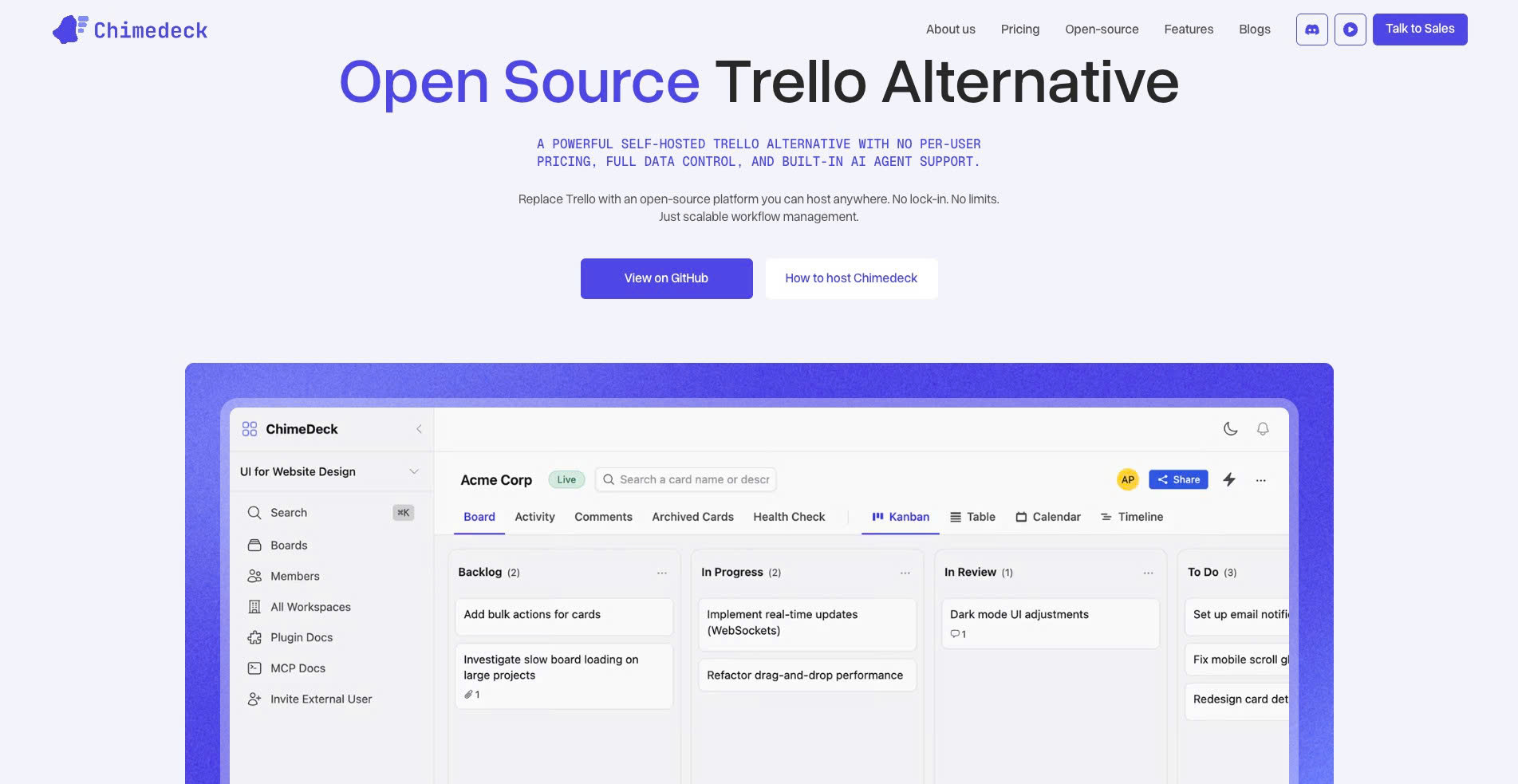
Chimedeck is one of the best task management tools for growing teams that want flexibility, scalability, and full control over their workflows. Unlike traditional SaaS project management platforms, Chimedeck is an open-source Trello alternative built around unlimited users, flexible deployment, and AI-powered workflows.
One of the biggest reasons businesses are starting to look at Chimedeck is cost scalability. Many task management platforms appear affordable in the beginning, but pricing increases rapidly as more users, automation rules, permissions, and advanced workflows are added. Chimedeck removes much of that limitation by giving teams the ability to self-host, customize their environment, and scale without expensive per-seat pricing.
The platform is ideal for startups, agencies, product teams, and businesses that want more ownership over their data and operational systems. Because it is open source, companies can adapt workflows to match internal processes instead of forcing teams to work around rigid SaaS limitations.
Another major advantage is Chimedeck’s focus on AI-powered workflows. As task management becomes more complex, businesses increasingly need automation, smarter task organization, and workflow optimization rather than simple Kanban boards. Chimedeck is designed with this modern operational mindset in mind.
For businesses comparing the best task management tools for long-term growth, Chimedeck stands out as a highly scalable and future-ready option.
Trello
Trello remains one of the most recognizable task management tools because of its simplicity and visual Kanban-style interface. Teams can quickly create boards, organize tasks into lists, assign owners, add deadlines, and track progress with minimal setup.
This simplicity makes Trello highly attractive for startups, freelancers, and small teams that need a lightweight workflow system. It works particularly well for content planning, marketing tasks, and internal team coordination.
However, Trello’s limitations become more visible as organizations scale. Advanced reporting, workflow automation, permission systems, and operational controls often require premium upgrades or third-party integrations. For larger teams, managing increasingly complex workflows inside Trello can become difficult.
Despite these limitations, Trello remains one of the best task management tools for teams that prioritize ease of use and fast onboarding.
ClickUp
ClickUp has become one of the fastest-growing task management platforms because it combines multiple productivity tools into one system. Teams can manage tasks, create documents, build dashboards, track goals, monitor time, and automate workflows within a single workspace.
Its biggest strength is flexibility. Teams can customize nearly every aspect of the platform, including views, statuses, workflows, automations, and reporting systems. This makes ClickUp attractive for agencies, operations teams, product teams, and businesses managing complex workflows.
ClickUp supports multiple project views such as lists, Kanban boards, calendars, timelines, and Gantt charts, helping teams work in whichever format suits them best.
The downside is that the platform can feel overwhelming for smaller teams or new users. Because there are so many customization options, workspace management and onboarding become important as the organization grows.
Asana
Asana is one of the best task management tools for structured team collaboration and cross-functional project execution. It is designed to help teams manage responsibilities, deadlines, dependencies, and project visibility more efficiently.
Asana works especially well for marketing teams, operations teams, agencies, and enterprise departments that need a centralized system for coordinating work across multiple stakeholders. Features such as timelines, workload views, project dependencies, and automation make it valuable for managing larger operational workflows.
The platform also has a clean and professional interface that balances simplicity with functionality, making it easier for teams to adopt compared to more technical systems.
However, advanced features often require paid plans, and costs can rise significantly for larger organizations with many users.
Notion
Notion combines task management, documentation, note-taking, and knowledge management into a highly flexible workspace. It has become particularly popular among startups, creators, remote teams, and modern digital businesses.
One of Notion’s biggest advantages is customization. Teams can build their own dashboards, databases, Kanban boards, calendars, content systems, and internal wikis based on their exact workflow needs.
This flexibility allows Notion to function as both a task management system and an operational knowledge hub. Teams can manage projects while keeping documentation, SOPs, meeting notes, and internal resources connected in one place.
However, Notion is not always ideal for highly operational or enterprise-level project management. Teams needing advanced reporting, workload balancing, complex automations, or large-scale project governance may eventually require additional tools.
Jira
Jira is one of the most powerful task management tools for software development teams and technical organizations. Built around agile workflows, Jira supports sprint planning, issue tracking, backlog management, release planning, and software development processes.
Engineering teams often prefer Jira because of its depth and workflow control. Teams can build highly customized workflows, manage complex ticket systems, and integrate development pipelines directly into the project management environment.
Jira is especially useful for organizations following Scrum or agile methodologies, where detailed tracking and sprint management are critical.
The tradeoff is complexity. For non-technical teams, Jira can feel difficult to configure and maintain. It requires more setup and operational discipline than simpler task management platforms.
Monday.com
Monday.com is a visual task management platform focused on team collaboration and operational visibility. Its colorful interface and flexible board system make it attractive for marketing teams, sales teams, HR departments, and agencies.
The platform supports automation, dashboards, task dependencies, timelines, and multiple workflow views. Teams can use Monday.com to manage projects, campaigns, onboarding processes, CRM pipelines, and internal operations.
One of its strengths is ease of visualization. Managers can quickly understand project status, team progress, and bottlenecks through visual dashboards and reporting features.
The primary concern for growing businesses is pricing scalability. As teams add more users and advanced features, subscription costs can increase quickly.
Airtable
Airtable blends spreadsheet functionality with database-style organization, creating a highly flexible task management and operational tracking platform. It works especially well for teams managing structured workflows, content operations, production schedules, or internal systems.
Unlike traditional task management tools, Airtable allows teams to build highly customized workflows using relational data, views, and automations. This makes it valuable for businesses needing both operational data management and project tracking in one system.
Marketing teams, media companies, operations teams, and agencies often use Airtable for campaign management, editorial calendars, CRM systems, and internal workflow automation.
However, Airtable requires thoughtful setup to unlock its full potential. Teams expecting an out-of-the-box project management solution may face a learning curve.
Todoist
Todoist is one of the best lightweight task management tools for individuals, freelancers, and small teams focused on personal productivity and daily organization. Its interface is clean, fast, and easy to use.
The platform excels at simple task management, recurring reminders, labels, priorities, and personal workflow organization. Users can quickly capture tasks and organize them into projects with minimal friction.
Todoist is ideal for users who want simplicity rather than complex project structures. However, it may not provide enough operational depth for larger teams managing advanced workflows or cross-functional collaboration.
Final Thoughts
The best task management tool depends heavily on how your team operates, how quickly you plan to scale, and how much flexibility you need. Some platforms prioritize simplicity, while others focus on enterprise workflows, customization, or deep operational control.
For teams wanting a lightweight and familiar workflow, Trello remains a strong choice. ClickUp and Asana are excellent for structured collaboration and customization. Jira dominates technical project management, while Notion provides flexibility for documentation-driven teams.
However, businesses evaluating long-term scalability should look beyond surface-level free plans and carefully consider pricing structure, workflow flexibility, user limits, and data ownership.
For organizations that want unlimited users, AI-powered workflows, open-source flexibility, and sustainable scaling without expensive per-seat pricing, Chimedeck stands out as one of the best modern task management tools available today.
The Scaling Problem with Traditional Task Management Tools
Most popular task management platforms charge per user. Trello, Asana, and Notion all scale costs with headcount. The logic is straightforward from the vendor's perspective: more users means more value, so charge accordingly.
Reality works differently. A company that doubles its team from five to ten doesn't gain proportional task management value. It gains complexity, but the underlying system does the same thing: track who works on what. This gap between per-user pricing and actual value delivery becomes severe at scale. A design agency managing fifteen client projects doesn't need fifteen times more tool capacity. It needs one system that handles fifteen workflows with different stakeholders and approval processes.

=>>> Read More: Task Organisation Methods for Growing Teams
Why Per-Seat Pricing Becomes a Hidden Tax on Growth
The mathematics of per-seat pricing creates a persistent drag on profitability as organisations scale. A startup with five people might pay fifty dollars per month for Asana. When the team doubles to ten, the cost doubles. At thirty people, it's three hundred dollars per month. By the time the company reaches one hundred people, it's spending thousands monthly on a tool that is providing the same core function it did at five people: visibility into who is working on what.
Some platforms offer unlimited plans, but priced only for large enterprises. Mid-sized teams fall in a squeeze: growth increases tool costs without corresponding capability gains. This affects hiring decisions. A project coordinator candidate means not just salary and benefits, but additional monthly SaaS costs. This creates poor incentives where companies under-invest in management infrastructure because the tooling scales in cost with headcount.
The alternative exists, but it's rarely considered in traditional tool evaluations. Open-source task management platforms like Chimedeck operate on a different financial model. Rather than charging per user, they charge for infrastructure. A team of one hundred people runs the same instance as a team of five. The cost doesn't scale with headcount. This fundamentally changes the economics of scaling a business.

=>>> Related Post: Task Management for Teams: Beyond Per-Seat Pricing
Evaluation Criteria That Actually Matter for Scale
Most tool comparisons focus on features: recurring tasks, Gantt charts, mobile apps. These matter, but they obscure what actually determines value at scale.
The first criterion is deployment flexibility. Can you run it on your own infrastructure, or are you locked into the vendor's cloud? Self-hosted systems give you direct access to data, configurations, and workflow definitions. For teams that build custom internal tooling, this is significant.
The second is extensibility. Proprietary tools constrain you to the vendor's vision. Open-source tools let you modify code when the roadmap doesn't align with your needs.
The third is cost structure transparency. Understanding how costs evolve over five years matters more than year-one pricing. Will costs scale with users, or does the pricing remain predictable as you grow?
When Open-Source Becomes Your Competitive Advantage
Open-source software has a reputation as niche infrastructure for technical companies. This is largely a residue of how the industry evolved. In reality, open-source task management offers specific advantages that proprietary tools cannot match, regardless of a company's technical sophistication.
The first advantage is vendor independence. When you use Trello, you depend on Atlassian's product roadmap, their pricing decisions, and their business viability. If Atlassian pivots the product or discontinues it, you're forced to migrate. Open-source tools eliminate this risk. Your data, your system, your process lives in code that you control. The vendor matters less because you have the source code. You can fork the project, maintain your own version, or contribute improvements that the broader community benefits from.
The second advantage is customisation. Proprietary tools limit you to vendor-designed configuration. Open-source tools let you extend beyond those constraints. Need a custom field or special approval process? Build it directly into the platform.
The third is integration clarity. With open-source tools, you have the source code. If the public API has gaps, you can read the code and build integrations that leverage internal functionality. This matters for teams building sophisticated workflows that depend on reliable information from your task management system.

AI-Powered Workflows: Beyond Task Lists
Traditional task management is about capturing and organising work: create, assign, track. This is table stakes, not differentiation.
The emerging question is what happens when systems understand your workflows well enough to automate them. Can the system suggest optimisations or automatically generate routine tasks? Can it integrate with AI to assist with content, analysis, or decision-making as part of the workflow?
This is different from external automation like Zapier. It's intelligence embedded directly into the workflow system. Open-source platforms build this more flexibly than proprietary tools because they're not constrained by vendor UI assumptions.
For teams managing complex processes, this becomes the actual decision criterion. The task management tool that can automate your workflow is worth more than a cheaper tool that forces you to use manual workarounds or external automation services. The financial calculus shifts when the system doesn't just track work but actively improves how work gets done.
=>>> See More: Benefits of Task Management Software | Chimedeck
Self-Hosted Tools and the Data Ownership Question
Data ownership in software has become a business-critical question, not an IT luxury. Whether you need it for compliance, integration, or peace of mind, the ability to host your task management system on your own infrastructure is increasingly central to how teams evaluate options.
Proprietary SaaS tools offer compliance certifications and security promises. They can be genuinely secure. But they don't give you direct control. Your data sits on their servers, in their databases, governed by their access policies. If you have unusual security requirements, tight integration needs with internal systems, or regulatory requirements that are hard to satisfy through a third party, this matters.
Self-hosted systems let you run the tool on your own servers, your own cloud account, or your own infrastructure. You control the database, the backups, the access logs, the disaster recovery. For regulated industries, for companies with strict data residency requirements, or for teams that are already running their own infrastructure, this is not a luxury consideration. It's a baseline requirement.
The barrier to self-hosting has dropped significantly. Modern self-hosted task management tools come with clear deployment documentation, they run on standard infrastructure, and they don't require a team of infrastructure engineers to operate. The question isn't "can we afford to self-host?" but rather "why would we not self-host when the alternative is trusting a third party with our operational data?"
Building vs Buying: The False Choice
The traditional framing is binary: use an off-the-shelf tool or build your own system. This creates a false choice that biases teams toward commercial SaaS tools. Building a task management system from scratch is expensive, slow, and requires significant engineering overhead. So teams use Trello or Asana and accept the constraints.
Open-source task management tools offer a third path. You're not building from zero, but you're not locked into a vendor's constraints either. You deploy an open-source platform, and you customize it to match your workflows. You can fork and extend it. You can integrate it deeply with your other systems. You can make it part of your infrastructure rather than an external service you depend on.
For teams managing complex workflows, scaling to meaningful size, or operating with tight cost consciousness, this approach often outperforms both the commercial tool and the build-from-scratch route. You get the rapid deployment and ecosystem support of an existing platform, plus the flexibility and control of a system you own.
The question of what the best task management tool is for your organisation ultimately depends on what you're optimising for. If you're optimising for immediate simplicity and don't expect significant growth, traditional SaaS tools are a reasonable choice. But if you're building an organisation that scales, if your workflows are non-standard, if you want to avoid the per-seat pricing trap as you grow, or if you need direct control over your data and systems, open-source alternatives offer capabilities that proprietary tools simply can't match. The conversation has shifted from "which tool should we use?" to "should we be using someone else's tool, or should we own our infrastructure?"