Top Task Tracking Tools: Scaling Beyond Per-Seat Pricing
Evaluate task tracking tools that scale with your team. Compare SaaS platforms vs open-source alternatives addressing cost, flexibility, and growth challenges.

Finding the right top task tracking tools is one of those problems that feels simpler than it actually is. Most teams start with a popular option like Trello or Asana, and it works fine for a while. Then the team grows. Workflows get more complex. Costs start climbing. Suddenly you're stuck between a tool that no longer fits your needs and the expensive, disruptive process of switching to something else.
The real issue isn't finding a good task tracking tool. It's finding a tool that scales with your team without breaking the bank or forcing you into rigid workflows designed for someone else's needs.
Top Task Tracking Tools
Chimedeck
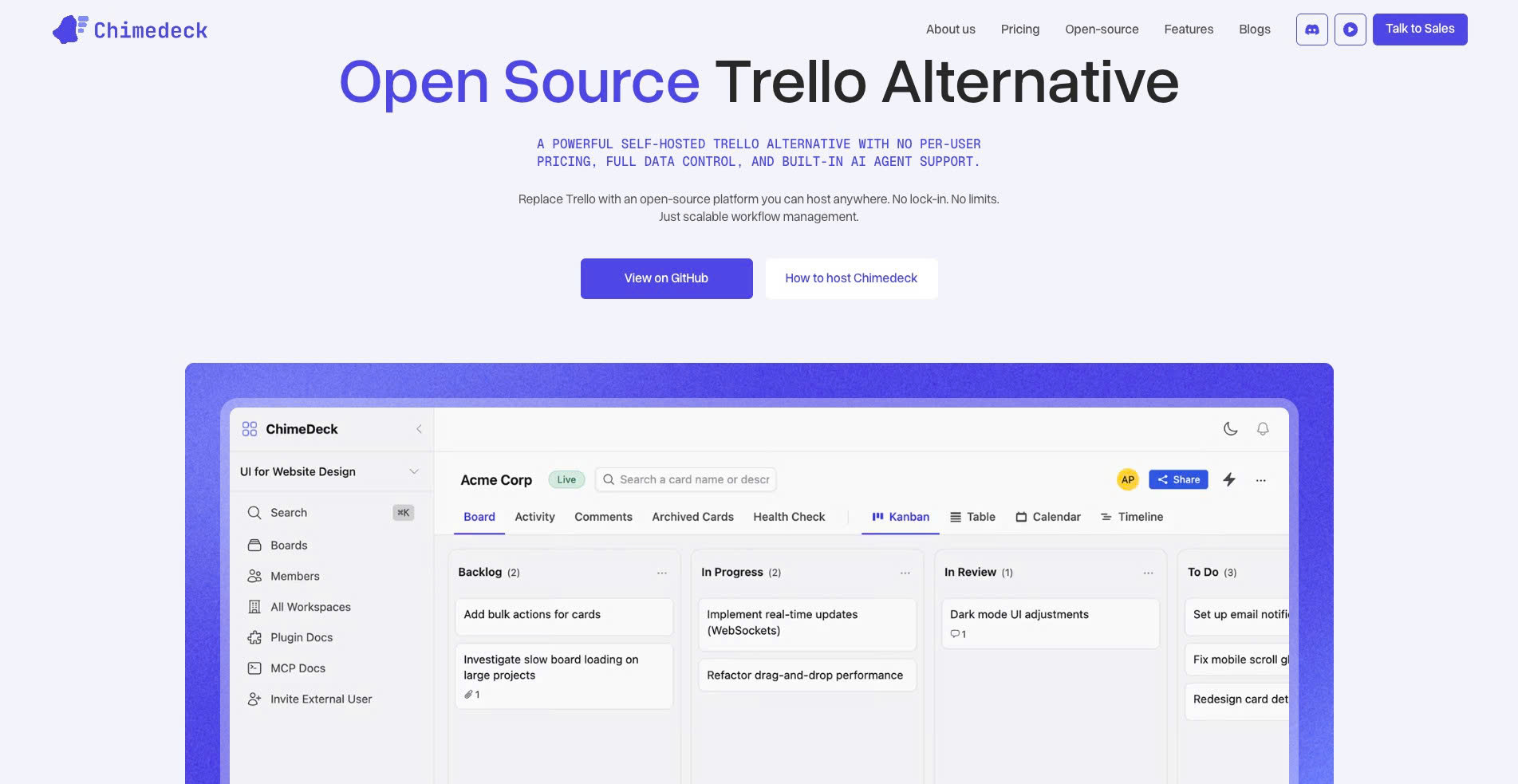
Chimedeck is an open-source task tracking tool built for teams that want more control, scalability, and flexibility than traditional SaaS-based project management platforms. As an open-source Trello alternative, Chimedeck is designed for businesses that want unlimited users, flexible deployment, and AI-powered workflows without being locked into expensive per-seat pricing.
One of Chimedeck’s biggest advantages is its scaling model. Many task tracking tools start free, but costs increase as more users, workflows, permissions, automations, and advanced features are added. Chimedeck takes a different approach by giving teams more ownership over how they deploy, customize, and scale their task management system.
Chimedeck is especially relevant for companies that care about data ownership, self-hosting, internal workflow control, and long-term cost efficiency. Teams can adapt the platform to their own processes instead of being restricted by rigid SaaS limitations. For technical teams, product teams, agencies, and growing companies, this makes Chimedeck a strong option when evaluating free task tracking tools.
Another important benefit is AI-powered workflow support. As teams grow, task tracking becomes less about simply moving cards from one column to another and more about reducing manual work, improving visibility, and keeping projects moving efficiently. Chimedeck’s AI-focused direction makes it suitable for teams that want a more modern and scalable task management system.
For businesses comparing free task tracking tools, Chimedeck stands out as a practical choice for long-term growth. It combines the familiarity of visual task management with the flexibility of open-source software, making it a strong option for teams that want to avoid vendor lock-in and rising subscription costs.
Trello
Trello is one of the most popular task tracking tools for teams that want a simple, visual, and easy-to-use workflow. Its Kanban-style boards allow users to organize work into cards, lists, and stages such as “To Do,” “In Progress,” and “Done.” This makes Trello especially useful for small teams, freelancers, content teams, and startups that need a lightweight way to manage daily tasks without a complex setup.
The main advantage of Trello is simplicity. Teams can create boards quickly, assign tasks, add due dates, upload files, leave comments, and move cards across workflow stages. For basic project tracking, Trello is easy to adopt and requires very little training.
However, Trello can become limited as teams scale. More advanced features such as deeper reporting, automation, workload management, and complex permission controls often require paid plans or additional integrations. For companies with growing operational complexity, Trello may work well at the beginning but become less flexible over time.
Asana
Asana is a strong task tracking platform for teams that need more structure around ownership, deadlines, project visibility, and cross-functional collaboration. It supports multiple project views, including list, board, and calendar views, making it suitable for marketing teams, operations teams, agencies, and internal business departments.
Asana is especially helpful when teams need to break larger projects into smaller tasks, assign responsibilities, set priorities, and track progress across multiple initiatives. It gives managers a clearer view of who is doing what, when tasks are due, and which work may be blocked.
The challenge with Asana is that many of its most useful scaling features sit behind paid plans. Advanced workflows, custom fields, automation, portfolio management, and detailed reporting may become necessary as teams grow. As a result, Asana can be effective for structured task tracking, but its total cost can increase quickly for larger teams.
ClickUp
ClickUp is an all-in-one task tracking tool designed for teams that want flexibility, customization, and multiple productivity features in one workspace. It includes task management, docs, dashboards, goals, whiteboards, time tracking, and automation features. This makes it attractive for teams that want to replace several tools with one centralized platform.
ClickUp works well for teams that need different ways to view and manage work. Users can switch between lists, boards, calendars, timelines, and dashboards depending on their workflow. It is useful for agencies, product teams, operations teams, and growing businesses that want a highly customizable task management system.
The downside is complexity. Because ClickUp offers many features, it can feel overwhelming for new users or teams that only need simple task tracking. Without clear workspace rules, ClickUp can become cluttered. For scaling teams, setup, training, and workspace governance are important to keep the system efficient.
Notion
Notion is a flexible workspace that combines task tracking, documentation, internal wikis, notes, and lightweight project management. It is popular among startups, creators, remote teams, and knowledge-based teams that want to manage both tasks and information in one place.
For task tracking, Notion allows teams to create custom databases, assign owners, set deadlines, add statuses, and build different views such as Kanban boards, tables, calendars, and timelines. This flexibility makes Notion useful for teams that want to design their own workflow instead of following a fixed project management structure.
However, Notion is not always the best fit for complex project execution. Teams that need advanced dependencies, workload balancing, detailed automation, or enterprise-level reporting may find Notion less powerful than dedicated task tracking tools. It is excellent for documentation-driven teams, but may require additional tools as operations become more complex.
Jira
Jira is a powerful task tracking tool built primarily for software development, product management, and technical teams. It is widely used for agile workflows, sprint planning, backlog management, bug tracking, issue tracking, and release management.
For engineering teams, Jira provides deep control over workflows, task statuses, priorities, tickets, user stories, and development cycles. It works especially well for teams using Scrum, Kanban, or other agile frameworks. Jira also integrates strongly with the Atlassian ecosystem, making it useful for companies already using tools like Confluence or Bitbucket.
The main limitation of Jira is its complexity. For non-technical teams, Jira can feel difficult to configure and manage. It often requires thoughtful setup, workflow design, and team training. While it is one of the most advanced task tracking tools for software teams, it may be too heavy for general business task management.
Todoist
Todoist is a simple and clean task tracking tool for individuals, freelancers, and small teams that need to organize daily work, recurring tasks, and personal productivity systems. It is known for its minimal interface, fast task capture, and easy priority management.
Todoist is useful for users who want a straightforward way to manage to-do lists, deadlines, labels, and reminders. It is not as complex as tools like ClickUp or Jira, which makes it easy to use for personal task management and lightweight team collaboration.
However, Todoist may not be ideal for larger teams or complex projects. It does not offer the same level of visual workflow management, reporting, or advanced project planning found in more robust task tracking platforms. It is best for simple execution rather than full-scale project management.
Monday.com
Monday.com is a visual work management platform that helps teams track tasks, projects, campaigns, and operational workflows. It offers customizable boards, automation, dashboards, and multiple project views, making it suitable for marketing teams, sales teams, HR teams, operations departments, and agencies.
The strength of Monday.com is its visual interface and flexibility. Teams can create custom workflows for different departments and use dashboards to monitor progress. It is particularly useful for teams that need a polished, centralized system for managing work across multiple functions.
The limitation is pricing. While Monday.com is powerful, costs can rise as teams add more users and require more advanced features. For businesses evaluating free task tracking tools, Monday.com may be attractive during the early research stage, but long-term scalability and subscription cost should be considered carefully.
Wrike
Wrike is a task tracking and project management tool built for teams that need structured planning, collaboration, and reporting. It is commonly used by marketing teams, creative teams, professional services firms, and enterprise organizations.
Wrike supports task assignments, folders, timelines, dashboards, proofing workflows, and workload management. It is useful for teams that need to coordinate complex projects across multiple stakeholders and departments.
However, Wrike may feel more advanced than necessary for small teams or users who only need basic task tracking. Its stronger features are most valuable when a team has mature processes and enough project volume to justify a more structured platform.
Airtable
Airtable combines spreadsheet-style organization with database functionality, making it a flexible option for task tracking, content calendars, project planning, CRM workflows, and operational systems. Teams can create custom tables, fields, views, and automations to match their exact workflow.
Airtable is especially useful for teams that need to track structured data alongside tasks. For example, a marketing team can manage campaigns, content assets, deadlines, owners, publishing stages, and performance data in one workspace.
The downside is that Airtable is not a traditional task management tool. It can become powerful when customized well, but teams may need time to design the right structure. As usage grows, advanced permissions, automation, and collaboration features may also require paid plans.
The Scaling Problem Most Teams Don't See Coming
When you've got five people using Trello, life is good. The tool does what it's supposed to do: you create cards, move them between lists, and get basic visibility into what everyone's doing. But somewhere between twenty and fifty people, something shifts.
Your board becomes unwieldy. The simple three-column workflow no longer reflects reality. You need custom fields, more sophisticated automation, better reporting. You want to track dependencies between tasks. You need to enforce process discipline without killing productivity. That's when you start looking at platforms like Asana or ClickUp, which promise more power and flexibility.
The problem isn't the power of these tools. It's what comes with it: complexity that your team doesn't need, features no one uses, and a pricing model that penalises growth.

The Per-Seat Pricing Trap
Here's a calculation most growing teams face but never openly discuss. You start with Trello at USD 10 per person per month. Five users. Fifty dollars. That's sustainable. By year two, you're at fifteen people. You're paying USD 1,800 annually just to track tasks. The tool still does the same thing it did at five users, but now it's starting to feel expensive relative to what you're getting.
So you switch to Asana or Monday.com. They promise better reporting, automation, custom fields. The per-seat cost is similar or slightly higher, but the feature set feels worth it. You implement the tool. Set up workflows. Train the team. Six months later, you're at twenty-five people. Your annual bill is now somewhere between USD 4,000 and USD 6,000 a year, depending on which tier you're on and how many integrations you need.
By the time you're fifty people, that bill is USD 10,000 to USD 15,000 annually. For something that your team considers foundational infrastructure, that's a significant fixed cost. And it scales linearly with headcount, which means your fastest-growing periods are also your most expensive ones.
For teams that are growing aggressively or that have high staff turnover, this becomes a budget line item that keeps growing faster than your ability to use more features. You're not getting more functionality per person. You're just paying more for the same thing.

The Flexibility Wall
Another trap, less obvious but equally painful, is the flexibility ceiling. Traditional SaaS tools are designed to serve the broadest possible market. That means they include features most teams never use, and they exclude flexibility for the specific workflows that make your operation unique.
You want task templates that auto-populate certain fields based on project type. Your tool either has a clunky template system or none at all. You need a custom status field that reflects your internal QA process. Your tool offers custom fields, but the automation rules around them are inflexible. You want to surface tasks from multiple tools in a single dashboard. Your tool integrates with some services but not others, and the integration is one-directional.
These aren't failures of the tools. They're inherent to building a product that needs to make sense to millions of potential customers. But they mean your team ends up working around the tool rather than having the tool work for you.
Some teams accept this and build workarounds through integrations, macros, or manual processes. Others decide to custom-build on top of an open-source foundation that lets them implement exactly what they need without waiting for product roadmaps or paying for features they'll never use.

What Actually Drives Task System Decisions
When teams evaluate top task tracking tools, they typically focus on surface features: does it have kanban boards? Can we assign tasks to multiple people? Is there a mobile app? These matter, but they're not what separates tools that work from tools that fail.
What actually matters is whether the system scales with your team's growth, complexity, and cost constraints. Will it still make sense when you're twice the size? Can it adapt when your process changes? Will the costs remain reasonable as headcount grows?
You also need to know whether you're actually getting value from features you're paying for. A USD 15,000 annual bill for task management feels expensive until you compare it to the inefficiency cost of a broken process. But if your team could get 80 percent of the functionality you need from a simpler, cheaper tool, that extra USD 10,000 a year is pure waste.
The third consideration is control and data ownership. If your task tracking system goes down, can your team still function? If the vendor changes their pricing model or discontinues a feature you depend on, do you have options? If you need to migrate, how portable is your data? These questions feel abstract until they matter.
Beyond the SaaS Default
For decades, the task tracking category has been dominated by SaaS vendors. You pay monthly, you get hosted infrastructure and regular updates, and you accept that your data lives in their systems. This model works well for certain use cases and certain teams.
But it's not the only option. A growing number of teams are evaluating self-hosted task management tool alternatives, particularly those built on open-source foundations. These tools offer something fundamentally different: you control the infrastructure, you own the data, and you pay for hosting costs rather than per-seat user fees.
The appeal is straightforward for teams that value cost predictability, data ownership, or the ability to heavily customise their workflows. Instead of paying USD 10 to USD 50 per person per month, you pay infrastructure costs that don't scale with headcount. Instead of being limited to what the vendor decides to ship, you can modify the source code, add custom integrations, and build the system you actually need.
This doesn't mean open-source task management systems are objectively better than SaaS tools. They require different tradeoffs. You need someone capable of managing the infrastructure. You don't get the same level of polish or customer support. You're responsible for security patches and upgrades. But for teams that can handle these responsibilities, the flexibility and cost advantages are substantial.
The Role of AI and Automation
Modern task systems increasingly need to do more than organise cards. Teams expect automation: automatically routing tasks based on criteria, generating suggested next steps, detecting bottlenecks, helping with prioritisation.
SaaS platforms add this through integrations with services like Zapier or native automation rules. It works, but it fragments your system. Your logic lives in the automation tool, your data lives in the task tool, and when something breaks, it's not clear which system is responsible.
Newer platforms are building automation and AI directly into the task system itself. This means workflow logic, task generation, and intelligence can all operate within a single source of truth. It also means you don't pay for separate automation services or deal with the latency and failure points that come from connecting multiple systems.
If you're building a system from scratch or migrating to a new platform, this integrated approach deserves serious consideration. It reduces complexity, improves reliability, and gives you more sophisticated automation without multiplying the number of tools you need to maintain.
Making Your Actual Decision
When you're evaluating task management tools, skip the feature matrix. Instead, ask three questions that matter:
First: how does this scale? Will your cost per person decrease, stay flat, or increase as you grow? Will the tool's complexity become manageable or overwhelming as your team doubles? Can you migrate to a larger instance or different tool if you outgrow it?
Second: how much control do you actually need? Are you comfortable with the vendor deciding your roadmap, or do you need flexibility to customise the system? Is data ownership important? Do you need self-hosted options?
Third: what integrations and automation matter? Will you end up building workarounds through external tools, or does the system support what you need? Is the automation flexible enough for your specific processes, or will you constantly be fighting constraints?
Most teams answer these questions and discover that the tool they chose based on feature comparisons isn't actually the best fit for how they operate. You might need something simpler than you thought. You might need more flexibility than traditional SaaS tools provide. You might discover that the cost structure of your current tool was never going to scale with your plans.
For teams that find the traditional tools limiting, open-source alternatives offer a compelling option. Platforms built on open-source principles give you cost predictability, full data control, and unlimited users by default. Pair that with modern features like AI-powered workflows and native automation, and you get a system that grows with your team without the cost or flexibility penalties that come with traditional SaaS tools.
The best task tracking tools aren't the ones with the longest feature lists. They're the ones that let your team work the way you actually work, scale with your growth, and remain under your control rather than your vendor's.
Frequently Asked Questions
What's the difference between task management tools and project management software?
Task management tools focus on individual task tracking, assignment, and visibility. Project management software typically adds scheduling, resource allocation, budget tracking, and timeline visualisation. Many tasks are created and tracked within projects, but task tools don't always include the broader project oversight features.
Can free task tracking tools really work for teams?
Free tools work well up to a point, usually around five to ten active users. Beyond that, you typically hit feature limitations or find yourself paying for add-ons. Whether a free plan is sufficient depends entirely on your workflow complexity and team size.
Is open-source task management mature enough to rely on?
Yes, but with caveats. Well-maintained open-source projects in this space are production-ready and used by teams of all sizes. The requirement is that you have the capacity to manage infrastructure and troubleshoot issues yourself, which most SaaS tools handle for you.
How do I know when it's time to switch task management tools?
Watch for signs that the tool is working against you rather than for you: constant workarounds, features you pay for but don't use, automation that requires external tools, inflexible workflows, or costs that don't make sense relative to what you're getting. If more than one of these is true, it's probably time to evaluate alternatives.