Trello for Developers: When It Works and When to Move Beyond
Explore Trello's strengths for dev teams and discover why many scale beyond it. Compare Trello to modern alternatives including open-source platforms for growing engineering teams.

Trello has long been the go-to tool for development teams seeking simplicity in project management. Its kanban-style boards, straightforward interface, and integration ecosystem make it an obvious choice for many engineers and engineering managers. Yet as teams grow and workflows become more complex, many developers find themselves reaching for something more sophisticated or cost-efficient. Understanding whether Trello fits your team's needs requires looking beyond its initial appeal.
The appeal of Trello for developers is genuine. It strips away unnecessary complexity and lets teams visualise work at a glance. Cards move across lists, pull requests get linked, and build status appears in real time. But this simplicity has a cost, both literal and operational.
Why development teams reach for Trello in the first place
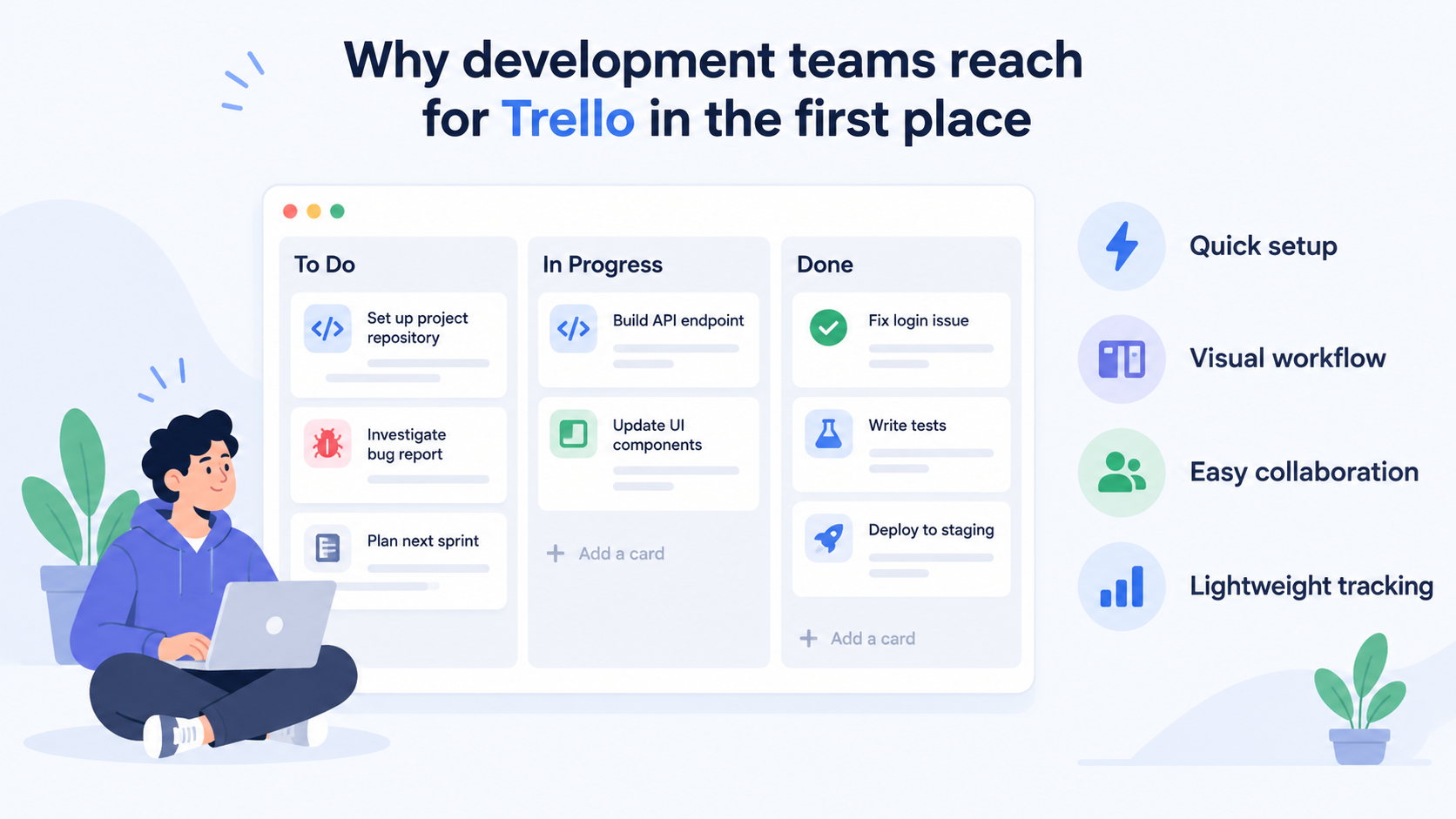
Trello solved a real problem for engineering teams: the need for a lightweight, visual workflow system that doesn't require weeks of configuration. Unlike heavyweight project management platforms, Trello gets out of the way. A new team can set up a board, create lists for "To Do," "In Progress," and "Done," and start tracking work within minutes.
For development teams, this speed-to-value matters. Developers already manage complexity in their code; they don't want their tools adding more friction. Trello delivers on that promise at the start.
The real draw for developers, though, is the ecosystem. Trello's Power-Ups and API allow teams to pull in data from GitHub, Jira, GitLab, Slack, and dozens of other services. A team can attach pull requests to cards, track CI/CD pipeline status, sync issues from GitHub in real time, and receive notifications when work moves across the board. This level of integration means Trello can sit at the centre of a development workflow without forcing teams to abandon their existing tools.
The power-ups marketplace includes GitHub + Trello 2-Way Sync (which pushes GitHub issues into cards), Code Snippets for syntax-highlighted code reviews, Story Points for agile estimation, and tools for sprint management and Pomodoro time tracking. For small teams and startups, this feels like having a custom-built system without the engineering overhead.
=> Read More: Trello for Project Management: Limitations and Better Alternatives
The developer experience: where Trello excels
When Trello works well for a dev team, it really works. A typical workflow might look like this: Product or engineering creates a card. The card gets a GitHub issue linked to it. As the developer opens a pull request, the PR link appears on the card automatically. Build status updates via a CI/CD integration. Teammates can comment directly on the card, and all of that context stays attached to the work.
This is lightweight project management done right. There's no separate system of record. Everything is visible, and friction is minimal.
For teams practising agile or kanban workflows, Trello's simplicity is a feature. The board becomes a single source of truth. Cards don't get buried in hierarchies or nested views. Work flows left to right, and blocked items stay visible. Developers appreciate this directness.
The API also opens doors for custom automation. Teams can build bots that automatically create cards based on production alerts, close cards when code gets deployed, or post daily summaries of board activity to Slack. This flexibility appeals to dev teams that want to shape their tools rather than adapt to them.
=>>> Related Post: Best Open Source ClickUp Alternatives 2026
Where the limitations begin to show
For smaller teams and short-term projects, these advantages often outweigh Trello's constraints. But as teams grow, the friction increases in several distinct ways.
First, there's cost. Trello's pricing model ties directly to the number of team members. Each new developer who joins means a new seat, and the per-seat cost compounds quickly. A team of 5 people might pay under £50 per month. A team of 25 pays substantially more. A team of 100 faces a real budget burden just for keeping everyone on the platform. This creates a perverse incentive: teams start looking for ways to reduce the number of seats, which often means limiting access to the board or asking people to share logins. Neither is ideal.
Second, customisation has hard ceilings. Power-Ups are powerful, but they're designed by third parties and limited by what Trello's API allows. If your team needs a specific workflow behaviour, custom field validation, or automated state transitions that Trello and its extensions don't natively support, you're often stuck. You can build workarounds, but you're working against the system, not with it.
Third, Trello ownership remains with Atlassian. The service lives in the cloud, and your data lives there too. If Atlassian changes pricing, deprecates a feature, or sunsets an integration, your team has limited recourse. Teams in regulated industries or with strict data residency requirements sometimes discover that Trello simply isn't an option, or requires additional compliance work to fit their requirements.
Finally, Trello's reporting and analytics capabilities are basic. For teams that need burndown charts, velocity trends, cycle time analysis, or capacity planning views, Power-Ups exist but they're optional add-ons. The core product assumes teams mainly need to see what's on the board today.
The scaling reality for development teams
The moment a development team hits around 20 people, these limitations start becoming visible. A team that size might span multiple projects or services. Coordination becomes harder. Trello's single-board paradigm starts to strain. Managing cross-board dependencies becomes a problem Trello wasn't designed to solve well.
At 50+ people, cost often becomes the primary concern. Many teams at that scale find themselves evaluating alternatives not because Trello is bad, but because the economics stop making sense. Paying for 50+ individual seats for a tool that's already reaching its feature ceiling feels wasteful.
For distributed teams, especially those spread across time zones, Trello's real-time updates and notification model works well. But the lack of deeper reporting means that managers often resort to manual status roll-ups and spreadsheets to track overall progress.
=>>> See More: Open Source Kanban Board: Self-HostedAlternatives to Trello
What developers actually need as they scale
The teams that move beyond Trello typically need one or more of the following:
Unlimited users without proportional cost increases. When headcount grows, adding every new person shouldn't double project management costs.
Self-hosting or flexible deployment. Some teams need to keep data on-premise or in a specific cloud region. Trello's cloud-only model doesn't work for them.
Deeper customisation and automation. Custom workflows, conditional state transitions, and programmatic access to fine-grained data become essential as operations get more complex.
Open-source architecture or source-available code. For teams that value independence and want to avoid vendor lock-in, open-source tooling offers long-term safety and control.
Built-in AI and workflow automation. Modern dev teams are increasingly looking for tools that don't just track work but help automate and optimise how work gets done.
Trello can satisfy some of these needs through add-ons and workarounds, but doing so often means stretching the tool beyond its intended scope. At a certain point, the effort of forcing Trello to fit becomes greater than the effort of moving to a purpose-built alternative.
Comparing Trello to modern alternatives for developers
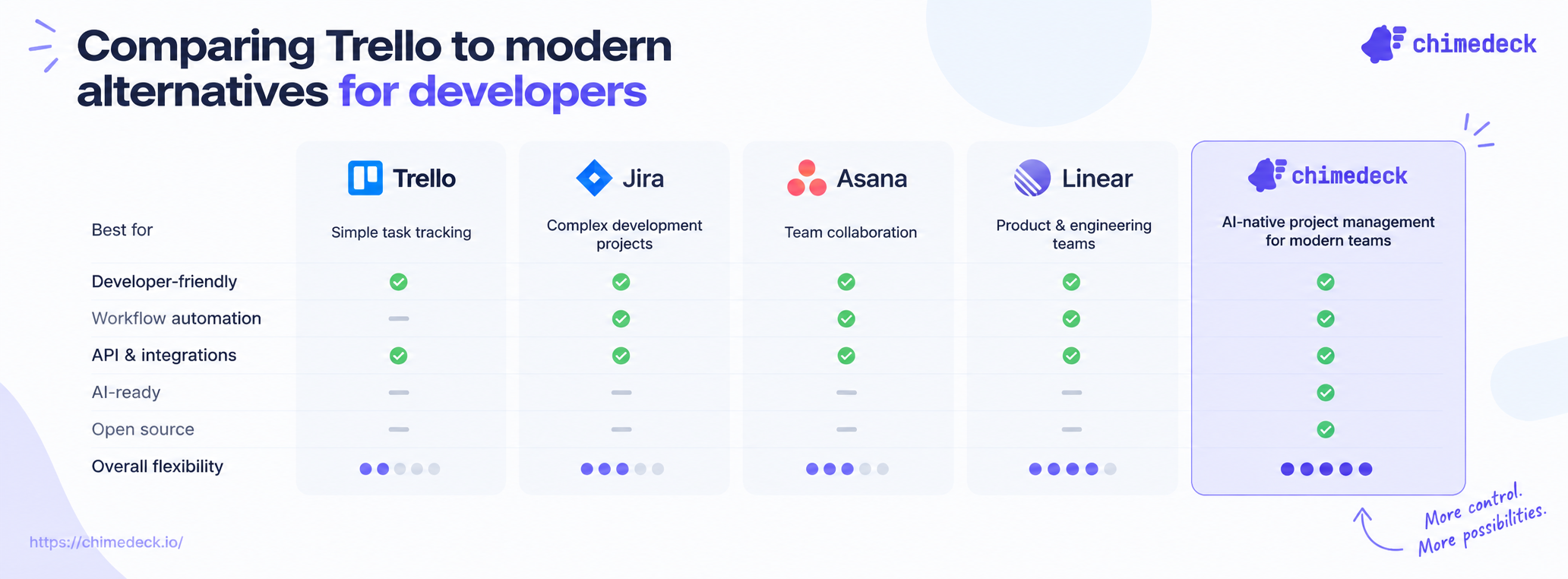
The landscape of developer-focused project management tools has evolved significantly. Asana, Monday.com, Notion, Linear, and others have carved out positions by targeting specific workflow needs. Each makes different trade-offs between simplicity and power.
Asana emphasises project hierarchy and timeline views. It's better for large, structured projects with clear dependencies but requires more setup than Trello.
Monday.com sells flexibility and visual customisation but carries a similar per-seat pricing model to Trello. It's visually richer but costs more at scale.
Notion is infinitely customisable but places heavy config burden on users. It's powerful for teams willing to spend time building their own system.
Linear has gained traction in the developer community specifically by focusing on issue tracking with a developer-first interface. It offers better performance than Trello for high-velocity engineering teams.
Yet all of these have a common trait: they're SaaS products with per-seat pricing and limited or no self-hosting options. They solve some of Trello's feature gaps but don't address the fundamental cost structure or data ownership questions.
Open-source alternatives, on the other hand, flip the model entirely. Teams get source access, unlimited users, and the ability to self-host or deploy to their own infrastructure. The trade-off is that setup and maintenance require more engineering effort upfront.
For teams that have the technical capacity and the strategic need for control, cost efficiency, and customisation, open-source project management platforms designed specifically for technical workflows offer a compelling alternative to the SaaS incumbents. They're particularly attractive to dev-led organisations where engineering teams already have the skills to maintain infrastructure.
Chimedeck as an open-source task management platform
Chimedeck is an open-source workflow and project management platform built specifically for teams that need more control than traditional SaaS tools allow. Unlike Trello, Chimedeck operates on unlimited users by default, meaning cost doesn't scale with headcount. It supports flexible deployment: self-hosted on your own servers, private cloud, or managed cloud hosting.
For development teams, this model removes the per-seat cost pressure entirely. Whether you have 10 developers or 100, your infrastructure costs remain predictable and tied to compute, not to the number of people using the system. Teams can also extend Chimedeck's workflows directly in code, build custom integrations without API rate-limit concerns, and maintain full data ownership.
Chimedeck's AI-powered workflow automation features make it appealing to teams looking for intelligent task prioritisation and process optimisation. The open-source architecture means you're not locked into a vendor's interpretation of how project management should work.
For teams that outgrow Trello, the move to Chimedeck typically feels like graduating to a more sophisticated system built for the complexity your team now faces. It's particularly well-suited to agencies, scaling startups, and engineering-led organisations where control and cost efficiency matter more than off-the-shelf simplicity.
Making the choice: Trello or something more
Trello isn't going anywhere, and for many teams, it remains the right choice. Small teams, short-term projects, and organisations that value simplicity above all else will continue to find it useful.
But if your development team is growing beyond 20 people, if per-seat costs are becoming a budget issue, or if you're regularly hitting the limits of Trello's customisation, it's worth evaluating what comes next. The cost of staying often exceeds the cost of moving once your needs have genuinely outgrown the tool.
The good news is that modern alternatives exist. Whether you choose a more powerful SaaS platform, move to open-source infrastructure, or build a hybrid approach, the market now offers options that directly address Trello's limitations whilst preserving what you value: clarity, integration, and developer-friendly workflows. The key is recognising when the trade-offs shift in favour of moving forward.