Best Trello Alternative for Remote Teams: How to choose?
Discover scalable Trello alternatives for remote teams. Learn about open-source solutions, unlimited user models, and cost-efficient project management tools that grow with your team.
When you're managing a small team, Trello is wonderful. It's intuitive, minimal friction to onboard, and your team can start organising work immediately. But somewhere around 15 to 20 people, the cracks begin showing. Your costs climb with each new hire. Feature limitations become obvious. The system that felt perfect for a 5-person startup starts to feel flimsy when you're running complex multi-stream workflows across departments.
For remote teams especially, this friction compounds. You're already dealing with asynchronous work, timezone fragmentation, and the challenge of keeping everyone aligned without the casual conversation that happens in an office. You need a tool that scales with you—one that grows in capability as your demands get more complex, without demanding you sacrifice control or blow up your budget every time you hire someone new. That tool exists, but it doesn't work the way Trello does.
Why Trello Becomes Limiting at Scale
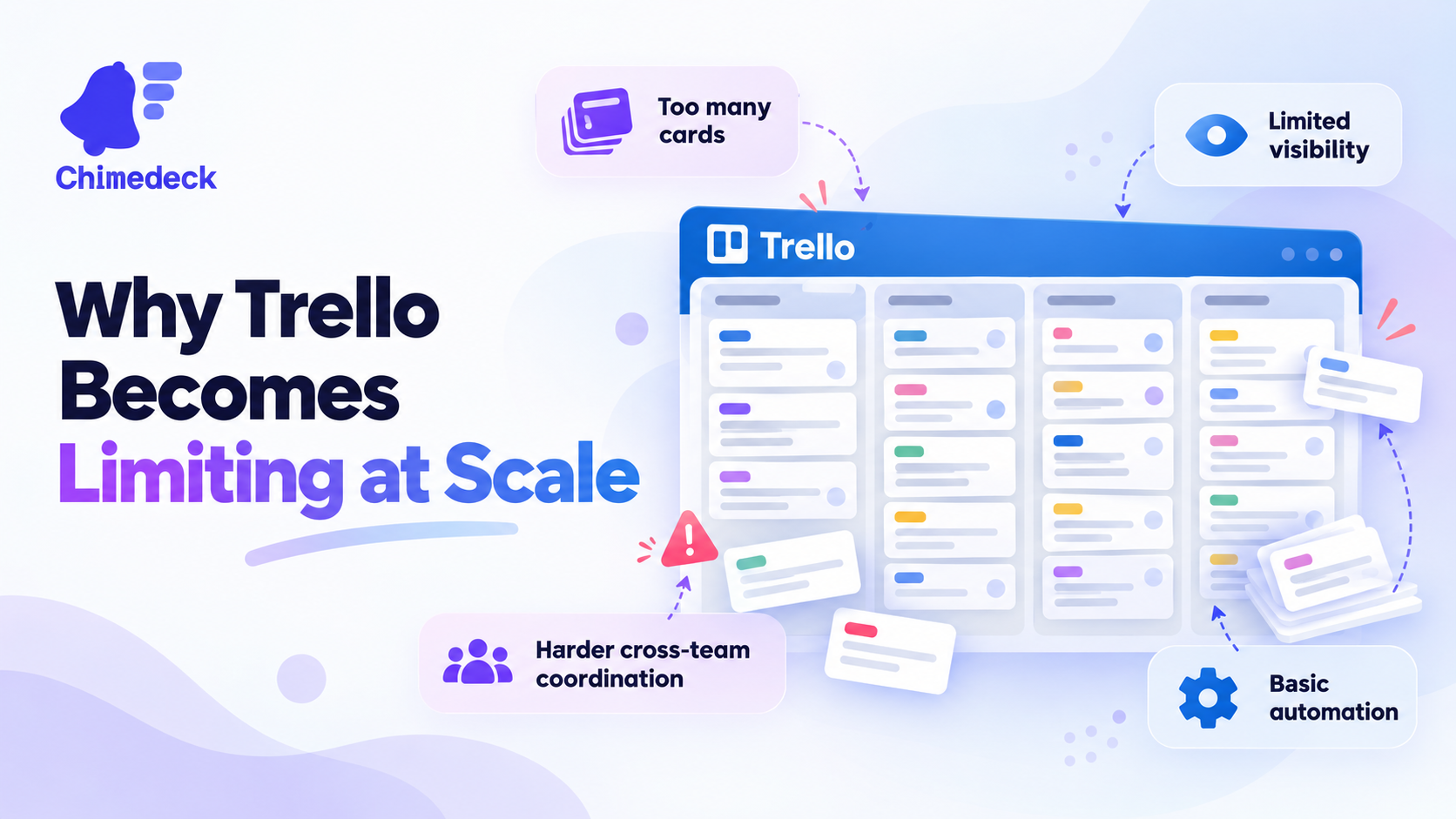
Trello's strength is also its constraint. It's opinionated about simplicity. A board, lists, and cards. It works brilliantly if your workflow fits that model. But as soon as your teams get larger or your operations get more intricate, you hit walls.
The first wall is usually cost. Trello's pricing is per user per month. That's straightforward until you have 30 people on your team. Or 50. You're suddenly spending thousands monthly on software that still can't do what you need it to do. You can't add custom data structures without a paid tier. Automation requires external tools. The philosophy of simplicity that made it attractive becomes a liability when you're trying to build sophisticated operational systems.
The second wall is flexibility. Remote teams operate differently depending on function. Your product team might be running sprints. Marketing might need a content calendar. Operations might be managing recurring processes with dependencies and approvals. Trello wasn't designed to accommodate all of that natively. You end up stitching together multiple tools—Trello for one thing, Zapier for automation, Airtable for data-heavy workflows—and suddenly your "simple" system is a fragmented mess.
The Real Cost of Per-Seat Pricing for Growing Remote Teams
Let's talk about what growth actually costs you in Trello. Assume a 20-person remote team using Trello's standard plan at GBP 10 per user monthly. You're spending GBP 2,400 a year. Sounds reasonable. Double your team to 40 people, and you're at GBP 4,800. Double again to 80, and you're nearly GBP 10,000 annually, and Trello still doesn't have the features you need for complex workflows.
This is the structural problem with per-seat pricing. It doesn't reward growth; it penalises it. Every new hire is a cost centre from a tooling perspective. In fast-growing startups or agencies managing multiple client accounts, this becomes absurd. You're paying more for a tool that still lacks the capability you need.
Open-source and self-hosted alternatives flip this model. You pay a flat infrastructure cost. Your first user, your fiftieth user, your five hundredth user—the cost structure doesn't change. For remote teams managing distributed work, this is significant. It aligns tool costs with actual value delivery rather than headcount. Tools like Chimedeck operate on this principle: unlimited users, no seat taxes, cost that scales with infrastructure needs, not team size.
What Remote Teams Actually Need From a Trello Alternative
If you're evaluating alternatives to Trello for a growing remote team, certain capabilities become non-negotiable.
First, real collaboration at scale. Not just comments on cards, but structured communication, task dependencies, progress tracking that multiple people can rely on. Remote teams need transparency across time zones and work streams. When one person finishes a task, the next person in the workflow needs to know immediately. This isn't about notifications; it's about building operational systems that work asynchronously.
Second, flexibility to adapt. Your workflow isn't static. A workflow that works for one project or team might not work for another. You need tools that let you define custom fields, build automations without external tools, and adjust structure without rebuilding everything. Task management tools built for flexibility allow this. They're designed to evolve as your operations evolve.
Third, cost transparency. You need to know exactly what you're spending and why. You need confidence that growing your team won't trigger unexpected cost escalation. And ideally, you want the option to self-host, which gives you control over infrastructure and data residency for distributed teams across different regions.
Fourth, intelligence in your workflows. This is where modern alternatives have leaped ahead. Trello's AI features are bolt-on and premium-only. The best alternatives embed automation and AI into the core system. They learn your workflows and suggest optimisations. They automate repetitive tasks. For remote teams, this is valuable; it reduces context switching and lets people focus on work that actually requires human judgment.
The Case for Open-Source and Self-Hosted Project Management
This is where open-source solutions differ from the Trello/Asana/monday.com landscape. They're fundamentally different products, not just cheaper knockoffs.
When you choose an open source trello alternative, you're not just avoiding per-seat pricing. You're gaining control. You can self-host on your own infrastructure. You can customise the platform to fit your exact workflow without lobbying the vendor to build a feature. You can integrate it with your internal tools directly rather than funnelling everything through Zapier. And you're not locked into a vendor's roadmap or pricing changes.
For remote teams operating across multiple countries, this matters. Data residency rules in some jurisdictions mean you need to control where information lives. Compliance requirements might mean you need customisation that a SaaS vendor will never prioritise. Some teams simply want to own their tools rather than rent them indefinitely.
But open-source doesn't mean bare-bones. The best alternatives now include AI-powered workflow automation built in, not tacked on. They support unlimited users because the cost model is fundamentally different—you're paying for infrastructure, not licenses. They're designed to be extensible, so your team can add integrations and customisations as needs evolve.
Evaluating Trello Alternatives: What to Look For
If you're seriously considering a move away from Trello, here's what matters:
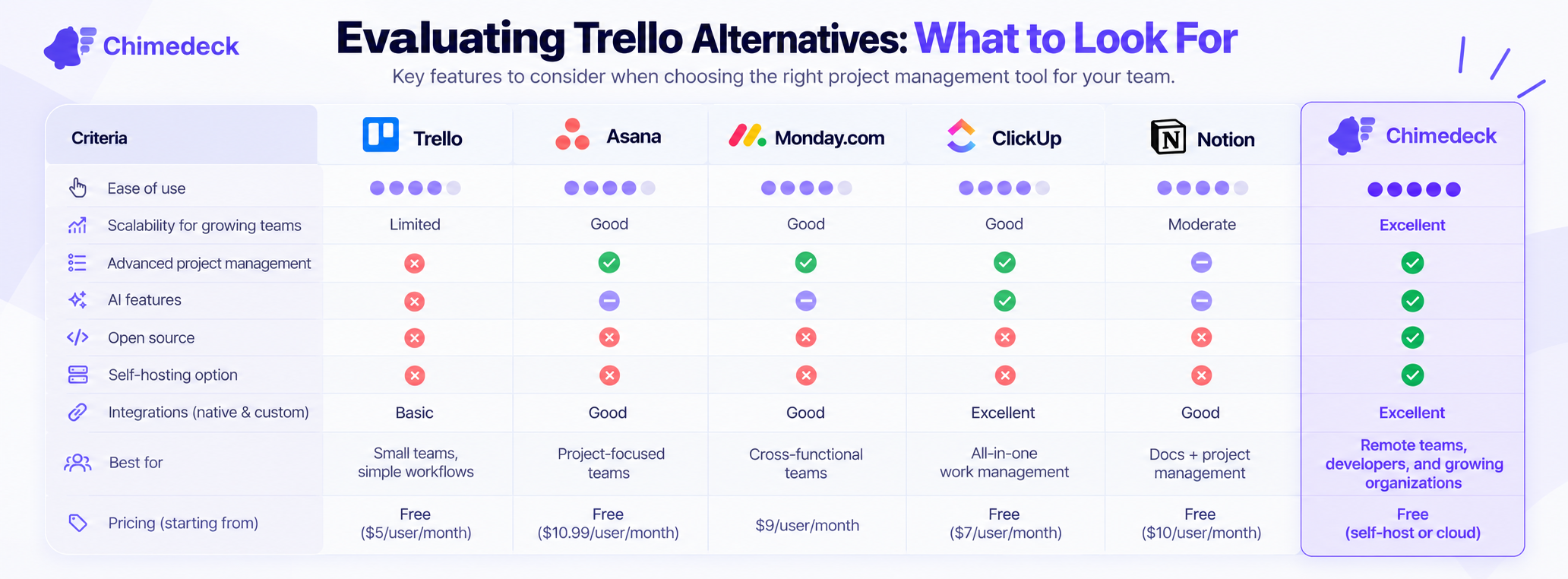
Cost structure first. Understand how the vendor makes money. Is it per seat, per month, or per project? What scales with your growth? Will the tool that fits your team today still make financial sense when you double in size? This should be your leading question, especially for remote teams where headcount growth happens quickly.
Deployment options. Can you self-host? Is cloud hosting available? Do you have choices, or are you locked into one model? Remote teams spanning multiple regions often have different residency requirements. Flexibility here is underrated.
Feature depth without bloat. You need more than Trello, but you don't necessarily need everything monday.com offers. The sweet spot is a tool that starts simple but lets you layer on complexity as you need it. Custom fields, automations, integrations, views—can you access these without paying for enterprise tiers?
Extensibility and integration. How does it connect to your existing stack? Can you build custom integrations, or are you limited to what the vendor officially supports? For remote teams relying on Slack, Google Workspace, and Zapier, this is essential.
Workflow automation as core, not premium. Automation should be part of the base system, not locked behind expensive plans. Remote teams depend on this to keep async work flowing.
Making the Transition
Switching tools is friction. Your team knows Trello. The boards are already built. There's mental inertia. But the cost and capability gap grows wider the larger you get. Most teams that make the switch report that the transition cost is recovered within months through better workflows, reduced tool fragmentation, and eliminated per-seat fees.
For remote teams specifically, the benefits compound. A system that adapts to your actual workflow—rather than forcing you to adapt to Trello—reduces overhead. Clearer visibility into dependencies and progress means fewer status-check meetings. Automation handles the busywork. You end up with more time for actual work.
The right free trello alternative or open-source solution isn't a downgrade from Trello. It's a different category entirely. It's built for teams that have outgrown simplicity and need systems that scale in capability, flexibility, and cost efficiency together.
Frequently Asked Questions
Is an open-source Trello alternative reliable enough for business-critical workflows?
Yes. Open-source projects like Focalboard, Wekan, and others are actively maintained with strong communities. The key is choosing one with regular updates and good documentation. Self-hosting means you own the reliability risk, but you also have full control over uptime and recovery. Many enterprises successfully run open-source project management systems critical to operations.
How difficult is self-hosting a Trello alternative?
It depends on the tool and your technical capacity. Some solutions offer Docker containers and simple setup; others require more infrastructure knowledge. Most modern open-source alternatives are designed with ease of deployment in mind. If you don't have in-house infrastructure expertise, managed hosting services or cloud deployment options can simplify this significantly.
Can I import my Trello data to another platform?
Most Trello alternatives support direct Trello imports. The quality of the import varies—sometimes it's automated, sometimes you'll need to do light mapping of fields. Some tools retain 90% of your structure; others require minor reworking. It's worth testing with a non-critical board first before moving your entire system.
What happens to collaboration and team communication if I move away from Trello?
Modern alternatives often have richer collaboration features than Trello—structured communication, threading, file sharing, and task-level discussions built in. If Trello is your source of truth and you're worried about losing integration with Slack or Teams, most alternatives integrate with these platforms just as well, sometimes better.
Chimedeck: Open-Source Task Management for Scalable Operations
Chimedeck is a free project management platform designed specifically for teams that outgrow traditional SaaS tools. It combines unlimited users with flexible deployment options and AI-powered workflow automation. Unlike Trello, which charges per seat, Chimedeck operates on a cost-aligned model where infrastructure expenses don't spike with headcount. It supports self-hosted and cloud deployments, making it suitable for remote teams with different residency requirements. With no per-seat pricing, extensible architecture, and built-in automation capabilities, Chimedeck bridges the gap between Trello's simplicity and the complexity that growing teams need.


