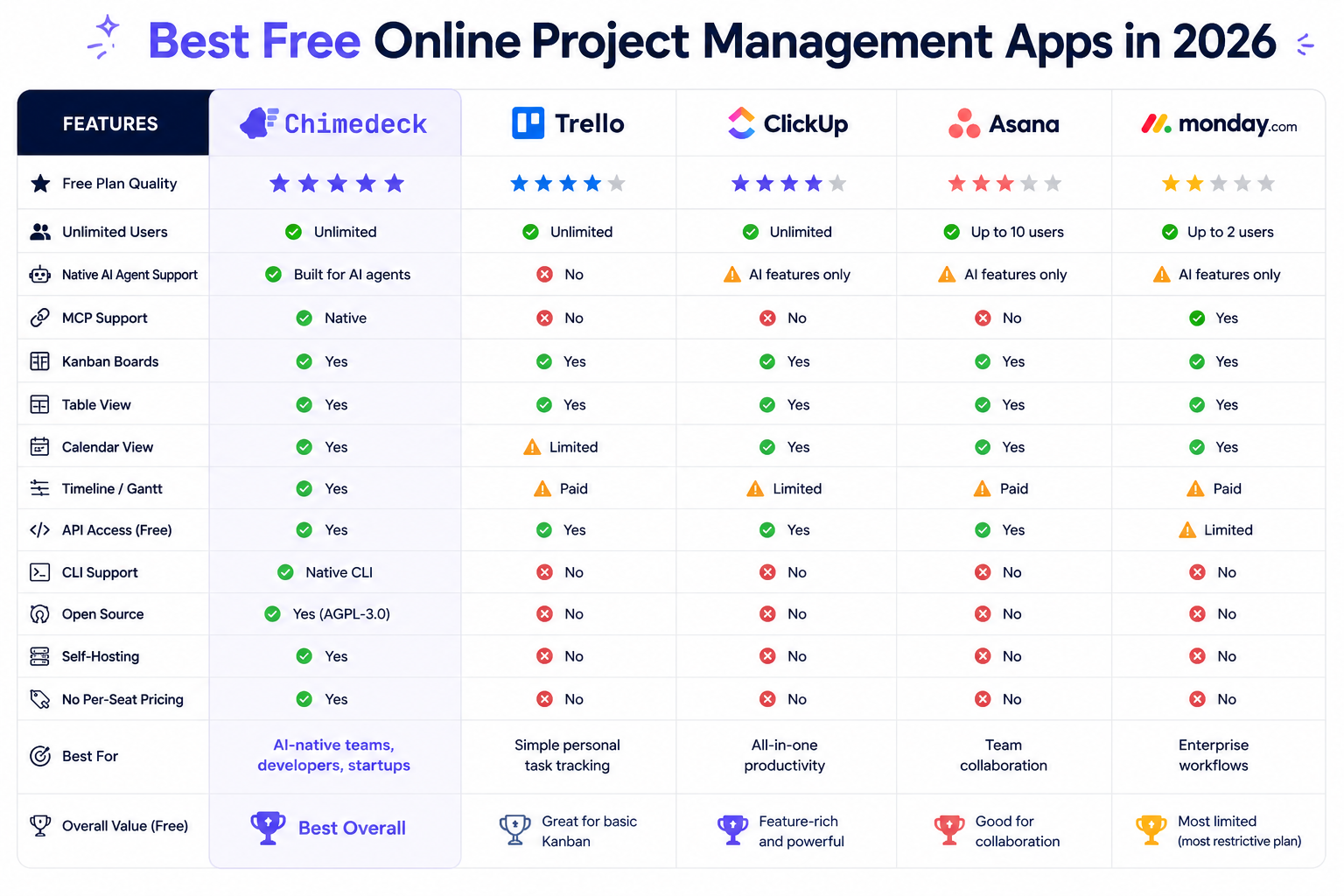
Best Free Online Project Management App in 2026
Find the best free online project management app for your team. Compare SaaS tools, open-source alternatives, and AI-powered platforms with unlimited users and no per-seat pricing.

When your team outgrows a spreadsheet, the search for a free online project management app typically starts with the usual suspects: Trello, Asana, or Notion. These tools are everywhere, easy to use, and free for small teams. But if you've spent time managing multiple projects across these platforms, you've probably bumped into their limitations. Teams quickly discover that free plans cap features, restrict collaborators, or force expensive upgrades as headcount grows.
The harder problem isn't finding any project management app. It's finding one that actually fits how your team works, doesn't nickel-and-dime you per seat, and can evolve as your needs change. Most free online project management tools are designed to get you hooked before the paywall appears. What's less common is a system built from the ground up to scale without breaking your budget or locking you into a vendor's roadmap. Chimedeck is built differently: unlimited users, no per-seat pricing, and the flexibility to customise workflows for your exact use case.

Why Free Doesn't Always Mean Cost-Effective
The economics of free project management tools look good on the surface. Trello, Asana's free tier, and Monday.com's starter plan cost nothing upfront. But this model depends on converting users to paid plans, which is where the real cost emerges. Once you hit a certain team size, most free tools start charging per user per month. For a team of 15 people, that adds up quickly.
Consider this: if Asana costs $10 per user per month, a team of 15 pays $150 monthly or $1,800 yearly, just for the basic tier. That calculus shifts entirely when your headcount doubles. At 30 people, you're looking at $3,600 per year. The "free" tool becomes more expensive than many of its competitors, and you're still stuck within the constraints of whatever the vendor decides to build next.
The real cost of a free tool isn't the upfront price tag. It's the switching cost when you realise it doesn't fit your workflow, and the monthly subscription burden that grows with every hire. This is why many teams operating at scale abandon the free tier entirely and start evaluating alternatives that offer unlimited users at predictable infrastructure-based costs rather than per-seat pricing.
=>>> Read More: How to Choose a Free Online Project Management App for AI Enabled Teams
What Distinguishes Open-Source and Self-Hosted Options
On the opposite end of the spectrum from SaaS free tiers sits the open-source project management app. OpenProject is a leading example, offering a self-hosted, free community edition with no per-seat pricing. You can run it on your own infrastructure, customise it completely, and add unlimited users without cost escalation.
This model flips the traditional economics on its head. Instead of paying a vendor monthly, you pay for your infrastructure. For many teams, that's either negligible or already embedded in their existing cloud budget. You own the data, control the deployment, and can modify the system to match your exact workflows rather than adapting your workflows to the tool.
The trade-off is operational overhead. You need someone with basic technical knowledge to deploy and maintain an open-source system. You don't get 24/7 vendor support or automatic updates. You're responsible for backups, security patches, and scaling your infrastructure. For small teams with no engineering resources, that overhead is a dealbreaker. For agencies, scaled startups, or companies with compliance requirements, self-hosting suddenly becomes attractive.
The shift toward open-source project management tools reflects a broader market trend. Teams are pushing back on per-seat SaaS pricing. Companies requiring data residency or compliance controls want self-hosted options. Organisations tired of vendor lock-in want the flexibility to modify their systems. Open-source tools address all three concerns in one package.

Evaluating a Free Online Project Management App for Your Team
The decision to choose a specific free online project management app shouldn't be based on which tool has the most features or the prettiest interface. It should be based on which tool aligns with your team's size, workflow, and growth trajectory.
Start with a simple question: are you scaling linearly or exponentially? If you're a stable team of 5 to 10 people with straightforward project tracking needs, any of the popular free options will work. Trello's simplicity, Asana's task hierarchy, or Notion's flexibility all solve the basic problem. The pain point emerges later when you hit 15, 20, or 30 people and the per-seat costs become prohibitive.
Next, think about workflow complexity. Simple kanban-style tools like Trello work brilliantly for visualising workflow stages. But if your processes involve dependencies, resource allocation, time tracking, or multi-layer approval workflows, you need something more sophisticated. This is where tools designed for enterprise-grade workflows start to make sense, even if you're currently small.
Finally, consider your data and deployment constraints. If you operate in a regulated industry, need to keep customer data on your own infrastructure, or simply want full control over your systems, self-hosted options like OpenProject become the only real choice. The operational cost of running your own instance is worth it if you avoid the compliance risk of keeping sensitive data on a third party's servers.
The Case for AI-Powered and Extensible Systems
A newer category of project management apps is emerging: systems that embed AI directly into workflow automation. Rather than relying on external tools like Zapier to automate tasks, these platforms generate tasks, suggest workflows, and optimise processes based on how your team actually works.
This matters because most teams have inconsistent workflows. One project runs like clockwork; the next one derails. Without embedded intelligence, you're relying on manual discipline to follow process. With AI-powered suggestions and automation, the system learns from your past work and highlights deviations before they become problems.
Extensibility is equally important. A free online project management app that can't integrate with your existing tools or adapt to custom workflows isn't actually free. You'll end up building workarounds, duplicating work across systems, or abandoning the tool altogether. Open-source workflow platforms designed with extensibility as a core principle allow you to build custom integrations, create custom fields and workflows, or even modify the core system to fit your exact needs.
This combination of AI-powered automation and extensibility points toward a new model: workflow infrastructure rather than a fixed feature set. Instead of buying a tool and adapting your work to fit it, you're buying a platform you can evolve alongside your organisation.
Comparing Your Options: Cost, Flexibility, and Scale
Here's how the major categories stack up when evaluated honestly:
Simple SaaS Tools (Trello, Asana Free, Notion) excel at visualisation and ease of use. Setup takes minutes. Free tiers are genuinely usable for small teams. Cost escalates steeply with headcount. Per-seat pricing at scale can exceed $150 to $300 per month for medium teams. Best suited for stable, small teams with simple workflows.
Open-Source Self-Hosted (OpenProject, Plane) offer unlimited users and full customisation. No per-seat costs. You own your data and infrastructure. Requires technical setup and ongoing maintenance. Best suited for teams with engineering resources or compliance requirements.
Mid-Market SaaS (Wrike, Zoho Projects, Asana paid tiers) add complexity and features. Free trials available but limited. Per-seat pricing is lower than enterprise tiers but still scales with headcount. Better workflow control and integration options. Best suited for growing teams that need more than kanban boards but aren't ready for self-hosting.
AI-Native and Extensible Platforms embed workflow intelligence and allow custom modifications. Cost model varies; some offer free tiers for single projects. Designed for teams that need flexibility and automation. Best suited for agencies, product teams, and organisations building internal systems.
The honest truth is that "best free online project management app" depends entirely on your context. There's no universal winner. What works for a 5-person agency doesn't work for a 50-person SaaS company. What fits a traditional software team doesn't fit a distributed, fully remote workforce.
Frequently Asked Questions
Can a truly free project management app handle team growth?
Most free tiers cap at 5 to 10 free users, then force paid upgrades. Some open-source options like OpenProject support unlimited users at no cost if self-hosted, but require infrastructure management. The key distinction is between "free to use" and "free to scale."
Should we pay for a premium project management tool or self-host an open-source one?
This depends on team size and engineering capacity. Under 10 people with simple workflows, a SaaS free plan is usually the right choice. Above 20 people, self-hosted open-source often becomes more cost-effective. Between 10 and 20 people, evaluate both based on your team's ability to manage infrastructure.
What's the fastest way to migrate from Trello to a more powerful system?
Most modern project management apps support bulk data imports or API-based migrations. The harder part is retraining your team on new workflows. Choose a tool that's closest to your current Trello workflow to reduce friction. Plan for a 2 to 3 week transition period where both systems run in parallel.
Do I need AI-powered features in a project management app?
Not immediately. AI-powered automation becomes valuable when you have enough historical data for the system to learn patterns (usually after 3 to 6 months of consistent use). For teams just starting with structured workflows, basic automation and integration options are more important than AI.
Chimedeck - MCP task management platform
Chimedeck is more than a traditional project management tool. It's a modern task management platform designed for collaboration between humans and AI agents. With built-in AI features, native MCP task management support, REST APIs, and a powerful CLI, Chimedeck enables AI to become an active participant in your workflows—not just another chatbot outside your workspace.