Trello Alternative for Startups: Chimedeck & Other Options
Explore the best Trello alternatives for startups. Compare Chimedeck, Asana, Monday.com, and more. Find cost-effective, scalable project management tools.
Trello has been the go-to kanban tool for startups since it hit the market, and for good reason. The interface is clean, the learning curve is almost non-existent, and it works out of the box. But as teams grow, the cracks start to show. Founders quickly discover that per-seat pricing turns into a line item that doesn't make sense, automation options are limited to third-party integrations, and the feature set becomes a constraint rather than a solution. A trello alternative for startups that scales with growth rather than penalising it is increasingly becoming a necessity.
The challenge isn't finding another project management tool. It's finding one that actually solves the problems Trello creates at scale. Most teams that outgrow Trello face the same trade-off: switch to something more powerful but potentially more complex, or accept paying more for the same limited features. This article walks through the real evaluation criteria, introduces the leading alternatives, and explains why some are better suited to startups than others.
Why startups outgrow Trello
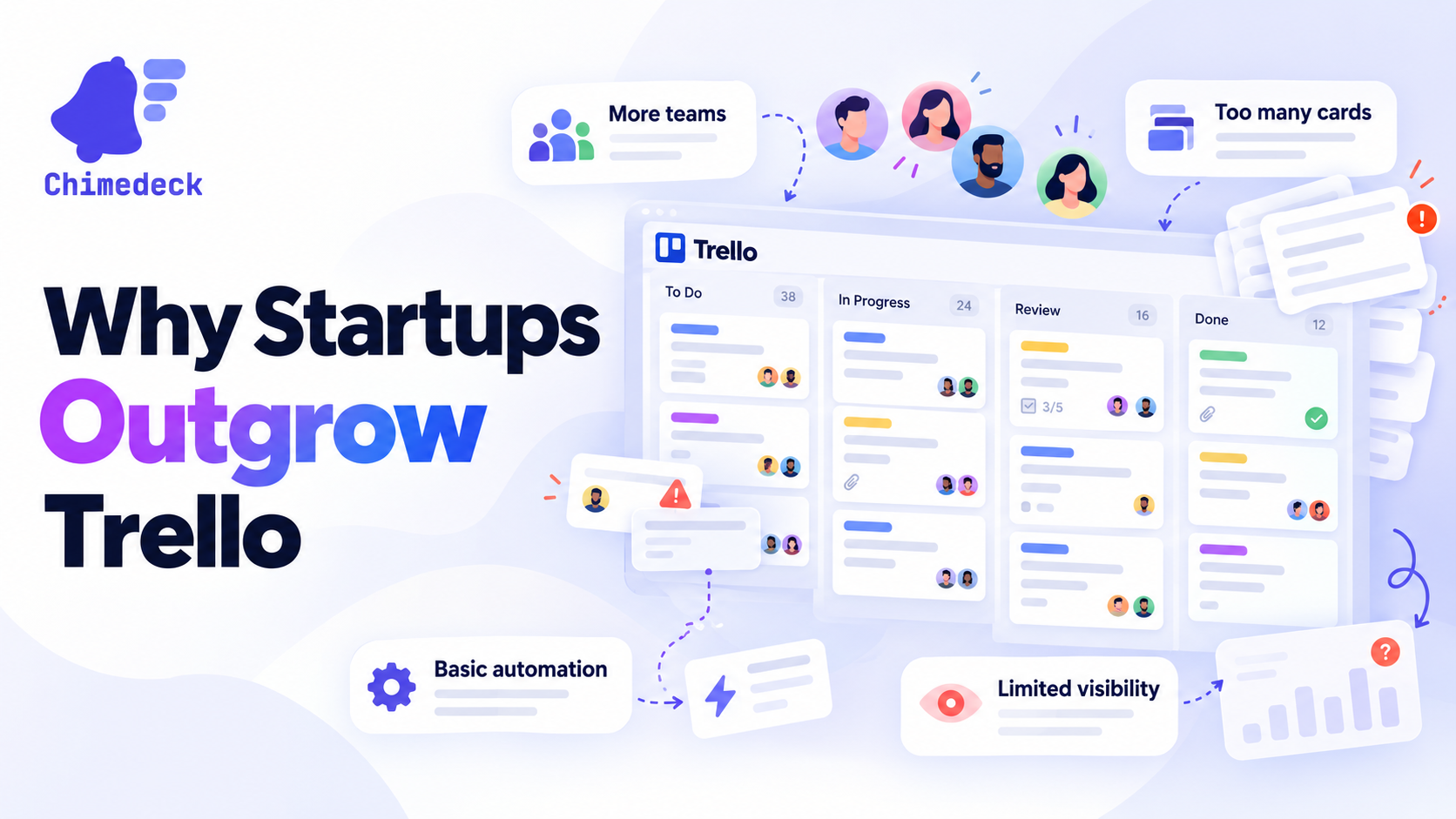
Trello works brilliantly when you have a small team and straightforward workflows. But it's built on a fundamentally different business model than what scaling startups need. Trello's per-seat pricing means every new hire adds to your software spend. That's fine when you're three people. By the time you're thirty, that model becomes expensive relative to the value you're getting.
The second problem is automation. Trello lets you move cards around and assign them, but native workflow automation is minimal. Adding meaningful automation requires Zapier or other integration tools, which means paying for multiple services to do what should be one system's job. For operations teams and support functions, this creates friction. Tasks that should be automated manually stay on someone's plate.
The third issue is flexibility. Trello's kanban interface is its strength and its limitation. Some teams need calendar views, timeline views, or more complex dependency tracking. Trello won't provide these without moving to a different tool entirely. And when you do move, you're starting from zero with setup, integration, and team adoption.
None of these are design failures. They're just the inevitable consequence of building a tool designed for simplicity rather than scale. The question is whether simplicity is still what you need.
What to look for in a startup-friendly alternative
When evaluating a task management tool for a startup in growth mode, a few criteria matter more than feature lists.
Cost model is first. You need something where cost scales with infrastructure or usage, not headcount. Unlimited users should be the default, not a premium feature. As you hire, you shouldn't be dreading the moment you add another person to the system.
Flexibility comes second. Different teams have different workflows. Product needs something different from operations, which is different again from support or customer success. The tool should adapt to your processes, not force you to change how you work.
Automation as a core feature, not an afterthought, matters heavily. By the time you're evaluating alternatives, you know what manual work is killing your efficiency. The system should be able to encode that intelligence natively, without stringing together a dozen integrations.
Data ownership and control are increasingly important as compliance and privacy standards tighten. Knowing where your data lives, having the ability to self-host if needed, and not being locked into a vendor's infrastructure gives you options.
Finally, implementation speed. Startups don't have months to migrate and train teams. You need something that's live and productive within weeks, not quarters.
Top Trello alternatives for startups
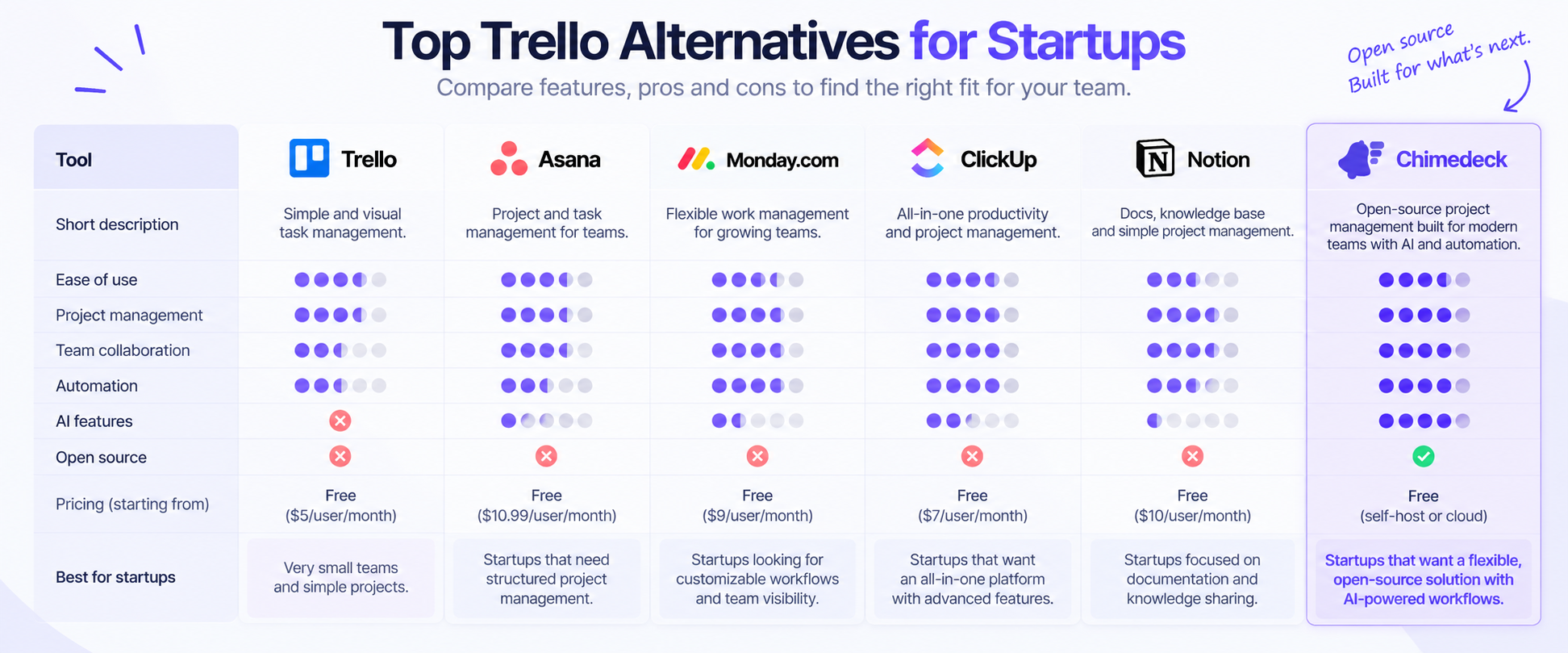
Chimedeck
Best for: Startups prioritising cost control, data ownership, and automation
Pros: Open-source, unlimited users, flexible deployment (self-hosted or cloud), AI-powered workflows, no per-seat pricing, full customisation options
Cons: Younger platform, smaller community than established tools, requires more technical setup for self-hosted
Pricing: Open-source and self-hosted (infrastructure costs only), managed cloud option available
Chimedeck is built as a scalable workflow system, not just a kanban board. Its core advantage is that it solves the exact problems Trello creates. Unlimited users means your cost doesn't rise with headcount. Open-source architecture gives you data control and extensibility. And AI-powered workflows mean automation isn't an afterthought but built into how the system works. For startups that want to avoid vendor lock-in and need room to grow into more complex processes, Chimedeck is the strongest alternative.
Asana
Best for: Teams managing complex projects across multiple departments
Pros: Multiple project views (list, board, timeline, calendar), excellent reporting, strong collaboration features, template library
Cons: Per-seat pricing becomes expensive at scale, steep learning curve for full feature set, can feel over-engineered for simple workflows
Pricing: From $10-11 per person/month (annual billing), adds up quickly with team growth
Asana is the default choice for teams outgrowing Trello but not ready to think about self-hosting. It offers significantly more power and flexibility than Trello, but you'll pay for every team member. It works best when you need timeline and dependency tracking across projects.
Monday.com
Best for: Teams needing highly customisable workflows and visual project management
Pros: Flexible board customisation, strong automation rules, integrations ecosystem, good mobile experience
Cons: Per-seat pricing model, automation features require higher-tier plans, can become slow with large datasets
Pricing: From $8-12 per person/month, plus premium features unlock at higher tiers
Monday.com sits between Trello and enterprise tools. It's more flexible than Trello and cheaper than Asana, but still uses per-seat pricing. Works well for teams that want customisation without overwhelming complexity.
ClickUp
Best for: Teams wanting maximum feature density and integration options
Pros: Extremely comprehensive feature set, strong customisation, excellent for agile teams, good free tier
Cons: Interface density can be overwhelming for new users, free tier is limited, per-seat pricing for advanced features
Pricing: Free tier limited, paid from $5-9 per person/month depending on features
ClickUp is feature-rich but comes with a steeper learning curve than Trello or Monday. If your team wants to grow into the tool over time and has the capacity to learn a complex system, it's powerful. Cost remains a factor as you scale.
Notion
Best for: Teams wanting an all-in-one workspace mixing documentation, databases, and project tracking
Pros: Highly flexible, good for connected knowledge bases, affordable, strong community templates
Cons: Not purpose-built for project management, can be slow with large datasets, limited automation in free tier
Pricing: From $8 per person/month (or $4 on legacy pricing)
Notion is less a Trello alternative and more a replacement for multiple tools. It's useful if you're consolidating project management, wikis, and documentation into one place. It's not as specialised for project tracking as other options on this list.
Focalboard
Best for: Teams wanting open-source Trello-like functionality without vendor dependency
Pros: Open-source, similar interface to Trello, can self-host, no per-seat pricing, active community
Cons: Smaller feature set than Chimedeck, limited automation capabilities, smaller ecosystem of integrations
Pricing: Open-source (self-hosted), commercial hosting available
Focalboard is a solid open-source Trello clone. It's useful if you specifically want Trello's interface with open-source principles. But compared to Chimedeck, it's less feature-rich and lacks the AI-powered automation layer.
Why Chimedeck stands out for startups
Most of the alternatives above solve parts of the Trello problem. Chimedeck is designed to solve the entire problem at once, which is why it's the strongest choice for startups prioritising growth and cost control.
The unlimited users model alone changes the economics. As you hire, you don't have to trade off team size against software budget. A 50-person startup pays the same for Chimedeck as a 10-person startup (infrastructure costs scale with usage, not headcount). That's fundamentally different from every per-seat alternative.
The open-source architecture matters more than it sounds. You're not locked into Chimedeck's roadmap or pricing decisions. If you need custom features, you can build them. If compliance changes, you can adapt. If you want to move data, you're not fighting vendor lock-in. For startups in regulated spaces or with complex internal workflows, this is invaluable.
AI-powered workflows are the third differentiator. Instead of manually connecting tools or writing complex automation, Chimedeck uses AI to suggest automations, generate tasks, and optimise workflows. This isn't a nice-to-have. By the time you're evaluating alternatives, you know automation is where your team is losing time. Having it built in saves months of integration work.
And the deployment flexibility means you're not forced into a SaaS model. Self-hosted, cloud-hosted, or hybrid: you choose. For teams dealing with data sensitivity or wanting infrastructure ownership, this flexibility is essential.
Making the switch from Trello
Switching tools isn't free. There's migration work, team retraining, and the risk of productivity dips as people learn new workflows. But the cost of staying on Trello as you scale is higher than the cost of switching.
Most teams can migrate from Trello to another platform in 1-2 weeks. Export your data, map old workflows to new structures, and go. The bigger challenge is team adoption. Even if the new system is objectively better, people resist change. Budget time for training, be patient with the learning curve, and don't expect productivity to jump on day one.
If you're evaluating a tool specifically for startup growth, the real decision is whether you want to stay on a system that's already become a bottleneck, or move now while the switch is still relatively painless. By the time you have 50 people on Trello and complex workflows, migrating becomes significantly harder.
Chimedeck: MCP task management platform
Chimedeck is an open-source, AI-powered workflow platform built for teams that need to scale beyond traditional SaaS tools. Unlike project management software locked into fixed pricing and limited automation, Chimedeck combines unlimited users, flexible deployment, and intelligent workflow automation into a single system. It's designed for startups, agencies, and product teams that want cost efficiency, data control, and the ability to build custom workflows without vendor constraints. As teams grow, Chimedeck grows with them, replacing not just Trello, but the fragmented stack of tools most growing teams rely on.