Task Management Meaning: Guide for Teams
Learn task management meaning, benefits, migration steps, workflow tips, and why Chimedeck is an open-source Trello alternative.
Teams rarely struggle because they lack motivation. They struggle because work becomes harder to see, track, prioritize, and improve as the company grows.
A startup may begin with a few Trello boards. A software team may track bugs in one place, product requests in another, and sprint tasks somewhere else. An agency may manage ten clients across disconnected boards, spreadsheets, and Slack threads. At first, this feels flexible. Over time, it becomes expensive, fragmented, and difficult to control.
That is why understanding Task Management Meaning matters.
Task management is more than creating to-do lists. It is the structured way teams capture work, assign ownership, set priorities, track progress, automate workflows, and improve delivery over time. For modern teams, especially distributed software companies, agencies, and operations teams, task management directly affects productivity, accountability, and operational efficiency.
This is also where Chimedeck becomes valuable. As an open-source project management platform, Chimedeck helps teams gain full workflow flexibility, open-source customization, self-hosted deployment options, better cost efficiency, and ownership of their data and processes.
So, could your team achieve more with a platform you truly control?
What Is Task Management Meaning?
Task Management Meaning refers to the process of organizing, assigning, tracking, and completing work in a structured system. In practical terms, it helps teams answer five essential questions:
- What needs to be done?
- Who owns the task?
- What is the priority?
- What is the current status?
- What happens next?
In a business environment, task management connects strategy with execution. It turns high-level goals into visible, actionable work.
For example, a product manager launching a new feature may need to coordinate design, engineering, QA, documentation, marketing, and customer support. Without a clear task management system, every team may move at a different speed. With a structured workflow, everyone can see ownership, deadlines, blockers, and dependencies.
=>>> Read More: What Is Task Management? A Guide for Growing Teams
Task Management vs. Project Management
Task management and project management are closely related, but they are not the same.
AreaTask ManagementProject ManagementFocusIndividual work itemsBroader project goalsScopeTasks, owners, status, prioritiesTimeline, budget, resources, risksBest ForDaily executionStrategic planning and deliveryExample“Fix login bug”“Launch new customer portal”
A strong project management platform usually includes task management software as a core feature. For agile software teams, this often appears as a Kanban board, sprint board, backlog, or workflow automation system.
![Task Management vs Project Management [3 Main Differences]](https://cdn.prod.website-files.com/69e98c02fbd01e4edcec984f/6a2137141261567dfd952a08_task-mngmnt-vs-project-mngmnt-1-800x480.png)
Who Should Use Task Management Software?
Task management software is useful for any team that needs better visibility, accountability, and coordination.
However, it becomes especially important for growing teams that have moved beyond simple checklists.
Startup Founders
Founders need to manage product, marketing, hiring, operations, fundraising, and customer feedback at the same time. A task management platform helps founders avoid scattered execution.
Instead of relying on memory or Slack messages, founders can create a clear operating system for the business.
Product and Engineering Teams
Engineering teams use task management to manage:
- Sprint planning
- Feature development
- Bug tracking
- Code review workflows
- QA tasks
- Release checklists
For software companies, task management works best when connected to agile workflow practices. A well-structured Kanban board can help engineering managers identify bottlenecks before they delay delivery.
Agencies Managing Multiple Clients
Agencies often need to manage many projects across SEO, content, design, development, paid media, and reporting. Without a clear system, client work becomes reactive.
A task management platform helps agencies standardize delivery while still customizing workflows for each client.
For example, an SEO agency may create reusable workflows for technical audits, keyword research, content briefs, on-page optimization, and reporting. Chimedeck can support this through customizable boards, templates, permissions, and workflow automation.
Remote and Distributed Teams
Remote team management depends heavily on clarity. When people are not in the same office, the system must show what is happening without constant meetings.
Task management supports remote teams by creating:
- Shared visibility
- Async updates
- Clear ownership
- Fewer status meetings
- Better documentation
- Stronger accountability
For distributed engineering organizations, task management becomes part of the team’s operating infrastructure.
Why Teams Are Moving Beyond Trello
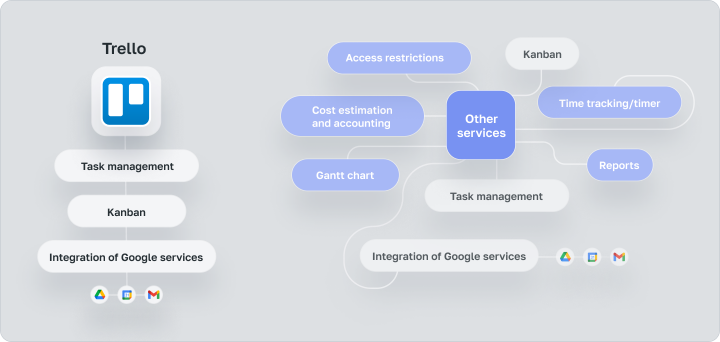
Trello helped popularize the visual Kanban board. It is simple, familiar, and easy to adopt. Many teams still use it successfully.
But as teams scale, they often start looking for a Trello alternative because their needs become more complex.
1. Per-User Pricing Becomes Expensive
Per-seat pricing can feel manageable for a small team. But once a company adds contractors, clients, freelancers, interns, external collaborators, or cross-functional departments, costs can rise quickly.
For agencies and software companies, this creates a common problem: the people who need visibility are not always the people who need full paid access.
Chimedeck is designed for teams that want better cost efficiency without being limited by per-seat SaaS pricing. This is especially useful for organizations that need broad collaboration across internal and external stakeholders.
2. Workflow Constraints Limit Growth
Basic Kanban boards are great for simple workflows. But growing teams often need more customization.
They may need:
- Custom task stages
- Advanced permissions
- Client-specific workflows
- Engineering handoff processes
- Automation rules
- Internal approval steps
- Custom integrations
- Self-hosted deployment
Traditional productivity tools can become restrictive when teams need workflow customization beyond standard templates.
Chimedeck gives teams more control over how work is structured, reviewed, automated, and improved.
3. Vendor Lock-In Creates Long-Term Risk
Vendor lock-in happens when a team becomes dependent on a platform but has limited control over hosting, pricing, customization, or data portability.
This matters for teams that handle sensitive information, client data, engineering roadmaps, or internal operational workflows.
An open source project management platform gives organizations more flexibility. Teams can inspect, adapt, and extend the system instead of depending entirely on a closed SaaS provider.
4. Data Ownership Matters More Than Ever
Data ownership is no longer just an IT concern. It affects compliance, security, operations, and business continuity.
Organizations increasingly want to know:
- Where is our task data stored?
- Who controls access?
- Can we self-host?
- Can we customize security policies?
- Can we export and migrate data easily?
- Can our workflows survive vendor changes?
For teams seeking a [Self-Hosted Trello Alternative], Chimedeck provides infrastructure control and greater ownership of data and processes.
Benefits of Open Source and Self-Hosted Task Management
Open source and self-hosted software are becoming more attractive for teams that want long-term control.
This is especially true for engineering organizations, agencies managing client information, and companies operating in regulated environments.
Data Privacy and Infrastructure Control
With self-hosted project management software, teams can deploy the platform on their own infrastructure. This gives technical teams more control over security, access, backups, and compliance requirements.
For example, a software company building a healthcare or fintech product may prefer to keep roadmap discussions, sprint tasks, customer issues, and internal notes inside controlled infrastructure.
Custom Workflows for Real Operations
Every team says they want productivity tools. What they really need is a workflow system that reflects how they actually operate.
A marketing agency may need boards for:
- Campaign planning
- Content production
- Client approvals
- SEO audits
- Reporting
- Retainers
An engineering team may need boards for:
- Backlog grooming
- Sprint execution
- QA review
- Deployment
- Incident response
- Technical debt
A self-hosted and open-source system gives teams more room to customize workflows instead of forcing every process into a rigid structure.
Better Integration Potential
Open-source project management tools are attractive because technical teams can extend them.
For example, an engineering team may want to connect task updates to GitHub, GitLab, Slack, internal dashboards, CI/CD pipelines, or customer support tools. An agency may want to connect tasks with CRM records, content calendars, reporting dashboards, or client portals.
Chimedeck supports teams that want a Task Management Tool they can adapt as their operations mature.
Long-Term Cost Savings
Cost savings are not only about subscription fees. They also come from reducing operational waste.
A scalable task management system can reduce:
- Duplicate work
- Missed handoffs
- Unclear ownership
- Excessive meetings
- Manual status updates
- Lost context
- Tool switching
Over time, this improves operational efficiency across the organization.
How to Migrate from Trello to Task Management Meaning
A migration should not be treated as a copy-and-paste exercise. The goal is not simply to move cards from one system to another. The goal is to improve how the team works.
Here is a practical migration framework for teams moving from Trello to Chimedeck or another Open Source Trello Alternative.
Step 1: Audit Existing Boards
Start by reviewing every active Trello board.
Ask:
- Which boards are still useful?
- Which boards are outdated?
- Which lists are duplicated?
- Which labels are unclear?
- Which cards have no owner?
- Which tasks are stuck?
This helps you avoid migrating clutter.
Step 2: Export Existing Data
Export relevant boards, cards, descriptions, members, checklists, labels, and attachments.
Before importing anything, decide what should be archived. Most teams discover that 20–40% of their old board data is no longer useful.
Step 3: Map Current Workflows
Create a simple workflow map before importing tasks.
For example:
- Backlog
- Ready
- In Progress
- Review
- QA
- Done
For agencies, the workflow may look different:
- Request Received
- Scoped
- In Production
- Internal Review
- Client Review
- Approved
- Delivered
The best workflow reflects how work actually moves through the team.
Step 4: Import Tasks into Chimedeck
Once workflows are mapped, import tasks into the right boards and stages.
During this step, clean up:
- Duplicate tasks
- Missing owners
- Outdated due dates
- Unclear titles
- Incomplete descriptions
- Unused labels
Good task hygiene makes the new system easier to adopt.
Step 5: Configure Permissions
Permissions are critical for scaling teams.
For example:
- Founders may need full workspace access.
- Engineering managers may need sprint and backlog access.
- Clients may only need access to selected boards.
- Contractors may only need assigned tasks.
- Operations teams may need reporting visibility.
Chimedeck helps teams structure permissions around real collaboration needs.
Step 6: Create Automations
Workflow automation reduces repetitive work.
Useful automations include:
- Move a task when a checklist is completed.
- Notify a manager when a task is blocked.
- Assign QA when development is complete.
- Create recurring tasks for reporting.
- Trigger review steps before delivery.
- Update labels based on priority.
Automation should support the process, not complicate it.
Step 7: Train Team Members
A task management migration fails when people do not understand the new operating model.
Create a short training guide that explains:
- How to create tasks
- How to name tasks
- How to assign owners
- How to use statuses
- How to update blockers
- How to close completed work
- How to communicate inside tasks
Training should be practical, not theoretical.
Step 8: Measure Adoption
After migration, track adoption for 30–60 days.
Useful adoption metrics include:
- Active users
- Tasks completed
- Overdue tasks
- Blocked tasks
- Average task cycle time
- Number of status update meetings reduced
- Percentage of tasks with clear owners
This tells you whether the new system is improving delivery.
Common Migration Mistakes and Solutions
MistakeWhy It HurtsSolutionMigrating every old cardCreates clutterArchive outdated tasks firstCopying old workflows exactlyPreserves bad habitsRedesign workflows before importNo permission planningCreates confusionDefine roles before launchToo many labelsReduces clarityStandardize labelsNo team trainingSlows adoptionCreate a simple usage guideNo success metricsMakes ROI unclearTrack adoption and delivery KPIs
How to Build a Scalable Team Workflow
A good workflow is not just a board. It is a repeatable system for moving work from idea to outcome.
Here is a step-by-step method for building a scalable workflow in Chimedeck.
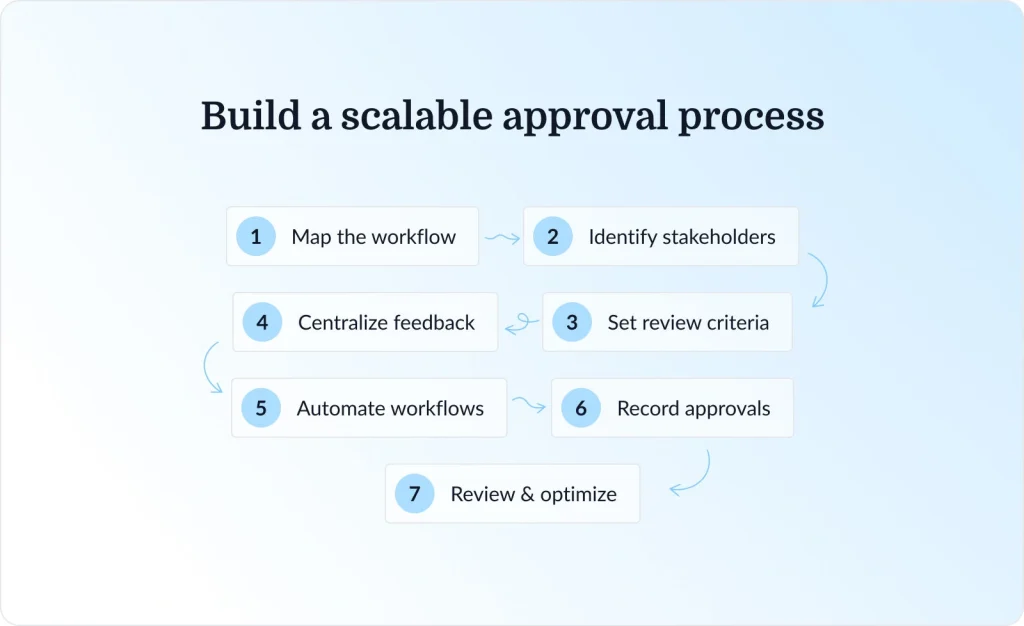
Step 1: Define the Process
Start by documenting how work should move.
For example, a software feature workflow may include:
- Idea
- Discovery
- Specification
- Design
- Development
- Code Review
- QA
- Release
- Post-Launch Review
A marketing workflow may include:
- Brief
- Research
- Draft
- Internal Review
- Client Review
- Revision
- Publish
- Report
Clear stages reduce ambiguity.
Step 2: Create Board Structures
Use boards to organize work by function, client, team, or project type.
Common board structures include:
- Product roadmap board
- Sprint board
- Bug tracking board
- Client delivery board
- Content production board
- Operations board
- Leadership priorities board
Avoid creating too many boards too early. Start simple, then expand as the team grows.
Step 3: Assign Ownership
Every task should have one clear owner.
This does not mean one person does all the work. It means one person is accountable for moving the task forward.
A strong task should include:
- Task title
- Owner
- Due date
- Priority
- Status
- Description
- Acceptance criteria
- Related files or links
This reduces confusion and improves accountability.
Step 4: Set Priorities
Not all tasks are equal.
Use a simple priority system:
- P1: Critical and urgent
- P2: Important but not urgent
- P3: Useful improvement
- P4: Backlog or future idea
For product and engineering teams, priorities should connect to customer impact, revenue impact, technical risk, or strategic goals.
Step 5: Implement Reviews
Reviews improve quality.
Examples include:
- Design review
- Code review
- QA review
- Content review
- Client approval
- Security review
- Post-launch review
A review stage prevents work from being marked “done” too early.
Step 6: Automate Repetitive Work
Automation helps teams scale without adding unnecessary manual effort.
Start with simple automations:
- Recurring weekly tasks
- Status change notifications
- Due date reminders
- Automatic task assignment
- Approval reminders
- Blocker alerts
As the team matures, automation can support more advanced agentic workflows.
Step 7: Track KPIs
A task management system should produce useful operational data.
Track metrics such as:
- Task completion rate
- Average cycle time
- Blocked task count
- Overdue task percentage
- Work in progress
- Sprint completion rate
- Client delivery time
- Review turnaround time
These metrics help managers improve the system instead of guessing.
Step 8: Continuously Optimize
Workflows should evolve.
Review the system every month and ask:
- Which tasks get stuck most often?
- Which handoffs create delays?
- Which automations save time?
- Which boards are unused?
- Which statuses are unclear?
- Which meetings can be replaced by better task updates?
This turns task management into a continuous improvement system.
Chimedeck vs Trello vs Asana: Cost and Control Comparison
Teams comparing productivity tools should look beyond surface-level features. The bigger question is control.
FeatureChimedeckTrelloAsanaOpen SourceYesNoNoSelf-HostedYesNoNoPer-Seat PricingNoYesYesCustom WorkflowsExtensiveModerateModerateData OwnershipFullLimitedLimitedKanban BoardYesYesYesWorkflow AutomationYesYesYesInfrastructure ControlYesNoNoVendor Lock-In RiskLowerHigherHigherBest ForTeams wanting control, customization, and scalabilitySmall teams wanting simple boardsTeams wanting structured SaaS project management
For teams seeking [Kanban Board Software] with long-term flexibility, Chimedeck offers a strong path forward. It keeps the simplicity of visual task tracking while giving teams more control over deployment, customization, and ownership.
Trends Shaping the Future of Task Management
Task management is changing quickly. The future is not just about better boards. It is about smarter, more adaptive workflow systems.
AI-Assisted Task Management
AI is already influencing how teams plan, summarize, prioritize, and automate work.
In task management, AI can help teams:
- Summarize long task discussions
- Suggest task priorities
- Detect blockers
- Generate checklists
- Create workflow recommendations
- Identify overdue risks
- Draft status updates
- Support agentic workflows
However, AI should not replace operational judgment. Teams still need clear ownership, quality control, and human review.
Agentic Workflows
Agentic workflows are systems where AI agents can take action across tools, not just provide suggestions.
For example, an AI workflow may:
- Detect a new customer issue.
- Create a task.
- Assign it to the right team.
- Add context from support tickets.
- Suggest a priority.
- Notify the owner.
- Track completion.
This is especially powerful when combined with open-source and self-hosted software because teams can customize the system around their own processes.
More Demand for Self-Hosted Software
Data sovereignty, privacy, compliance, and cost control are pushing more teams to consider self-hosted software.
This trend is especially relevant for:
- Enterprise IT teams
- Government contractors
- Healthcare technology companies
- Fintech teams
- Security-conscious startups
- Agencies handling sensitive client data
A [Self-Hosted Trello Alternative] gives these organizations more control over infrastructure and data governance.
Open-Source Collaboration
Open-source collaboration continues to shape how software teams build and operate. Teams increasingly value transparency, extensibility, and community-driven innovation.
For project management, this means more organizations will look for tools they can adapt, inspect, and extend.
Remote and Hybrid Work
Remote and hybrid work have made task clarity more important than ever.
In office-first environments, unclear work sometimes gets resolved through hallway conversations. In distributed teams, unclear work creates delays.
That is why modern team collaboration software must support async communication, clear ownership, transparent priorities, and reliable workflow tracking.
Chimedeck supports this shift by giving teams a flexible [Team Collaboration Software] foundation for remote and hybrid execution.
Actionable Recommendations for Better Task Management
To make task management work, teams should avoid overcomplicating the system.
Start with these best practices:
- Use clear task titles
A task title should describe the outcome, not just the activity. - Assign one owner per task
Shared ownership often leads to no ownership. - Limit work in progress
Too many active tasks reduce focus and slow delivery. - Define “done” clearly
Every task should have completion criteria. - Review blocked tasks weekly
Blockers are early warning signals. - Automate repetitive steps
Use workflow automation to reduce manual coordination. - Keep boards clean
Archive outdated work and remove duplicate labels. - Measure workflow health
Track cycle time, overdue tasks, and completion rates.
These practices apply whether your team uses Chimedeck, Trello, Asana, or another task management software. The difference is that Chimedeck gives teams more freedom to customize the system as they scale.
FAQ: Task Management Meaning
What does task management mean?
Task management means organizing, assigning, prioritizing, tracking, and completing work through a structured process. It helps teams understand what needs to be done, who owns each task, and what progress has been made.
What is the best Open Source Trello Alternative?
Chimedeck is a strong open-source Trello alternative for teams that want Kanban-style task management, workflow flexibility, self-hosted deployment, and better control over data and processes.
Why choose a self-hosted Trello alternative?
A self-hosted Trello alternative gives teams more control over infrastructure, data privacy, security, customization, and long-term costs. This is valuable for engineering teams, agencies, enterprises, and organizations with compliance requirements.
Is Chimedeck suitable for remote teams?
Yes. Chimedeck is suitable for remote teams because it supports transparent workflows, task ownership, project tracking, workflow automation, and async collaboration. These are essential for distributed teams.
How does Chimedeck compare to Trello?
Trello is a simple SaaS Kanban board tool. Chimedeck offers a more flexible open-source and self-hosted approach for teams that want greater customization, data ownership, and cost efficiency.
Can I migrate my Trello boards to Chimedeck?
Yes. Teams can migrate by auditing existing Trello boards, exporting data, mapping workflows, importing tasks, configuring permissions, creating automations, and training team members.
What are the benefits of self-hosted project management software?
Self-hosted project management software gives teams more control over data, hosting, security, workflow customization, integrations, and long-term operating costs.
Who needs task management software?
Task management software is useful for startup founders, product managers, engineering managers, software development teams, marketing teams, operations teams, agencies, and remote organizations that need better visibility and accountability.
Conclusion
Conclusion
Understanding Task Management Meaning is the first step toward building a more organized, transparent, and scalable way of working. As teams grow, simple to-do lists or basic Kanban boards often become too limited to support complex workflows, remote collaboration, client delivery, and cross-functional execution. That is why modern teams need a task management system that not only tracks work, but also improves ownership, prioritization, accountability, and long-term operational efficiency.
Chimedeck gives growing teams a more flexible path forward by combining the simplicity of visual task management with the advantages of open-source customization, self-hosted deployment, cost efficiency, and full data ownership. Instead of being locked into rigid SaaS workflows or rising per-seat pricing, teams can build a project management environment that fits their real processes and scales with them over time.
Ready to take control of your workflows? Explore Chimedeck today and discover how an Open Source Trello Alternative can help your team scale without the limitations of traditional SaaS tools.